A California business entity search tells you whether a company legally exists in the state before you sign a contract, form a new company, or extend credit. It is free, it runs on the California Secretary of State’s bizfile Online system, and it takes about a minute. This guide shows you how to run one and read every field it returns.
What Is a California Business Entity Search?
A California business entity search queries the Secretary of State (SOS) database at bizfileonline.sos.ca.gov/search/business for any state-registered company. It confirms name availability, status, filing history, and the registered agent. It does not cover sole proprietorships, non-filing general partnerships, or county-level DBAs.
| Attribute | Detail | Source |
|---|---|---|
| Official portal | bizfile Online (bizfileonline.sos.ca.gov/search/business) | California Secretary of State |
| Cost to search | Free | California Secretary of State |
| Status codes defined | 12 distinct statuses | CA SOS status definitions |
| New entity ID format | 12-character ID starting with “B” | CA SOS bizfile update |
| Minimum franchise tax | $800 per year | California Franchise Tax Board |
| Name reservation period | 60 days | California Secretary of State |
A DBA (doing business as, also called a fictitious business name) is filed with the county clerk, not the Secretary of State. So a corner store operating under a trade name will not appear in this search unless it also registered a formal entity. The bizfile database covers state-registered corporations, limited liability companies (LLCs), limited partnerships (LPs), limited liability partnerships (LLPs), general partnerships (GPs) that filed, and out-of-state entities registered to do business in California.
How Do You Perform a California Business Entity Search?
You run a California business entity search in five steps: open bizfile Online, pick Basic or Advanced search, enter your criteria, read the results table, then open a record for full detail. Basic search returns matches by name or entity number. Advanced search adds filters for status, entity type, and filing date.
Step 1: Open the portal. Go to bizfileonline.sos.ca.gov/search/business, the current SOS search run by the California Secretary of State.
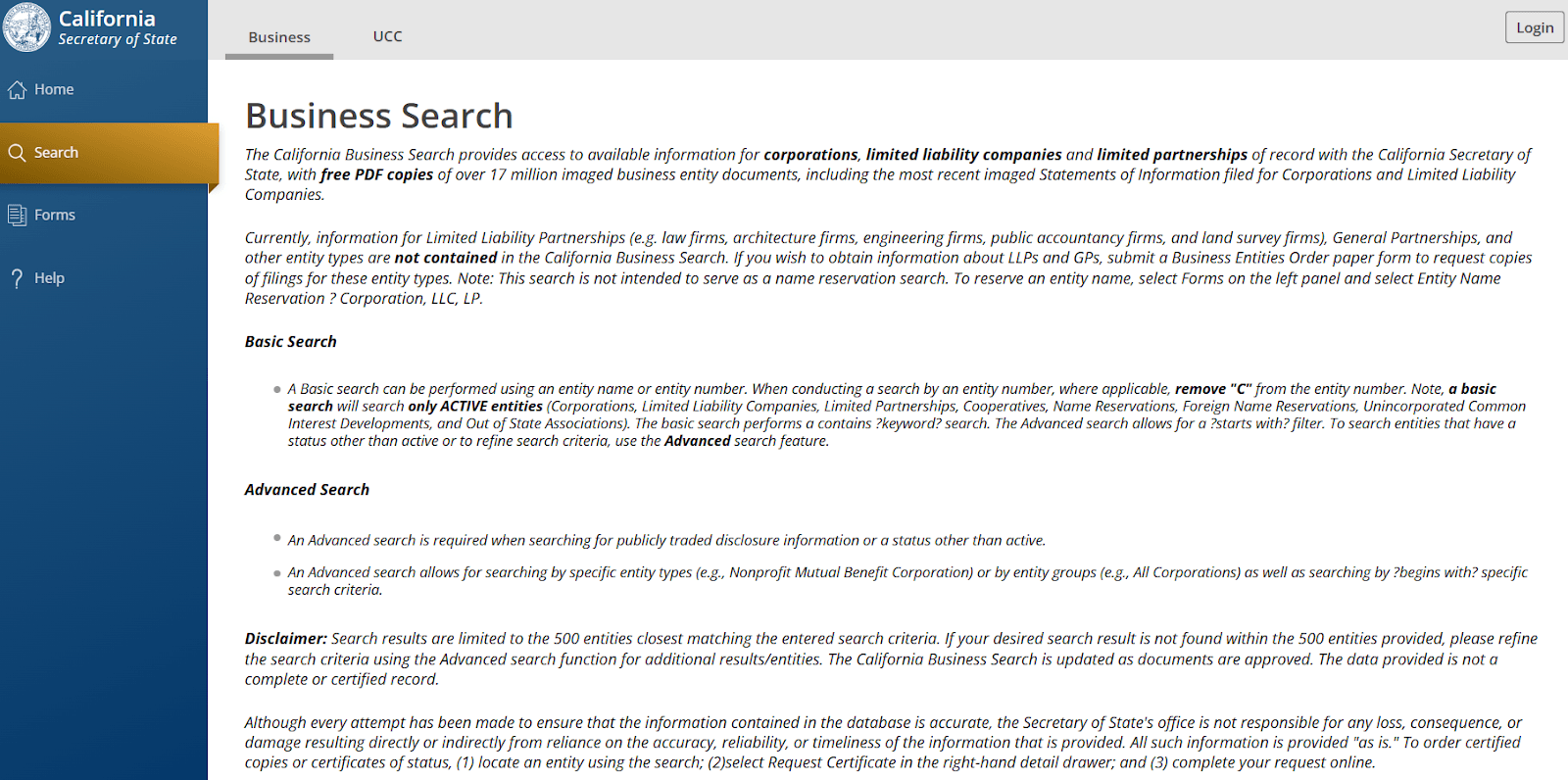
Step 2: Choose Basic or Advanced. Basic search matches a name or entity number. Click Advanced when you need to filter by Search Type, Entity Type, Status, or Initial Filing Date.
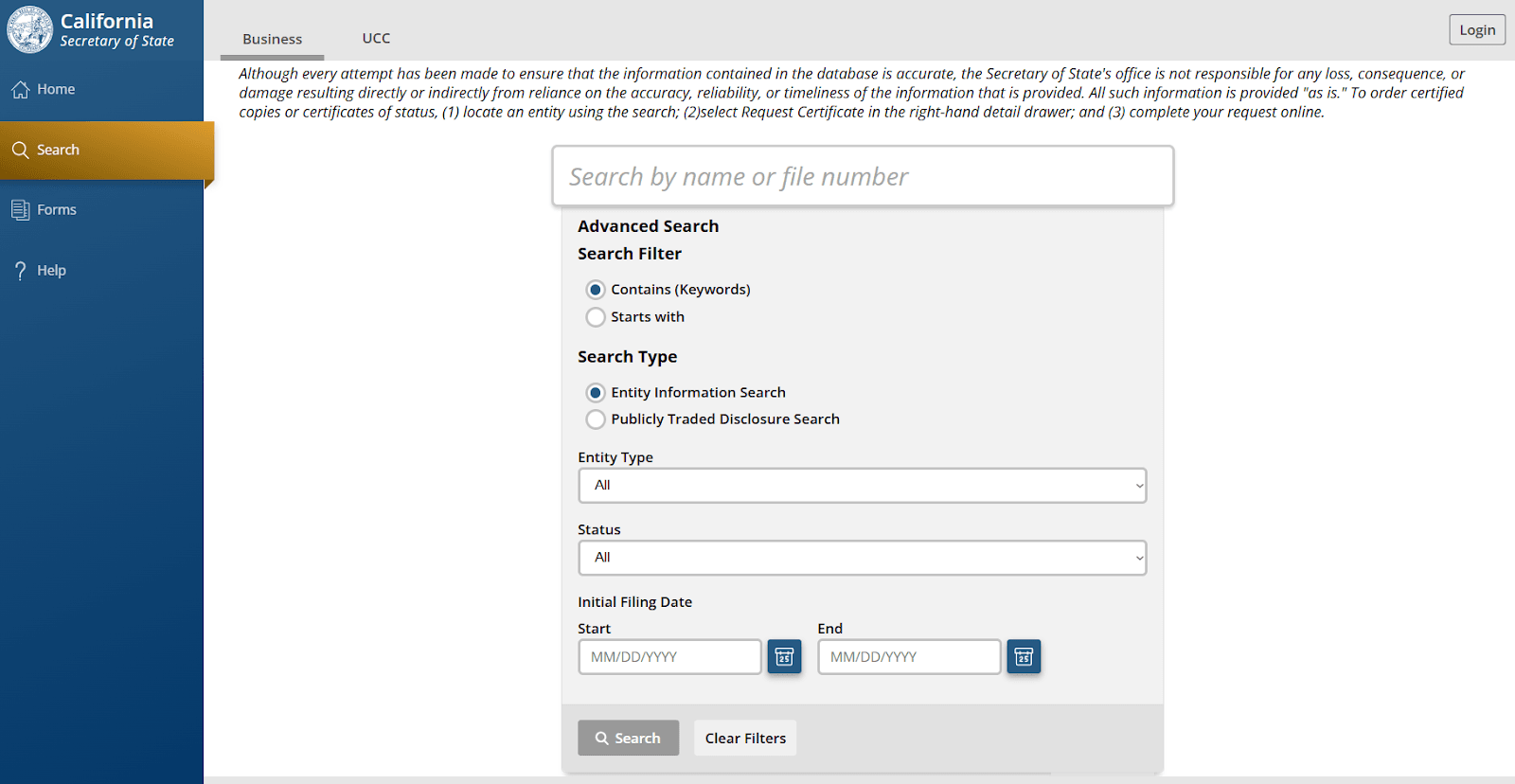
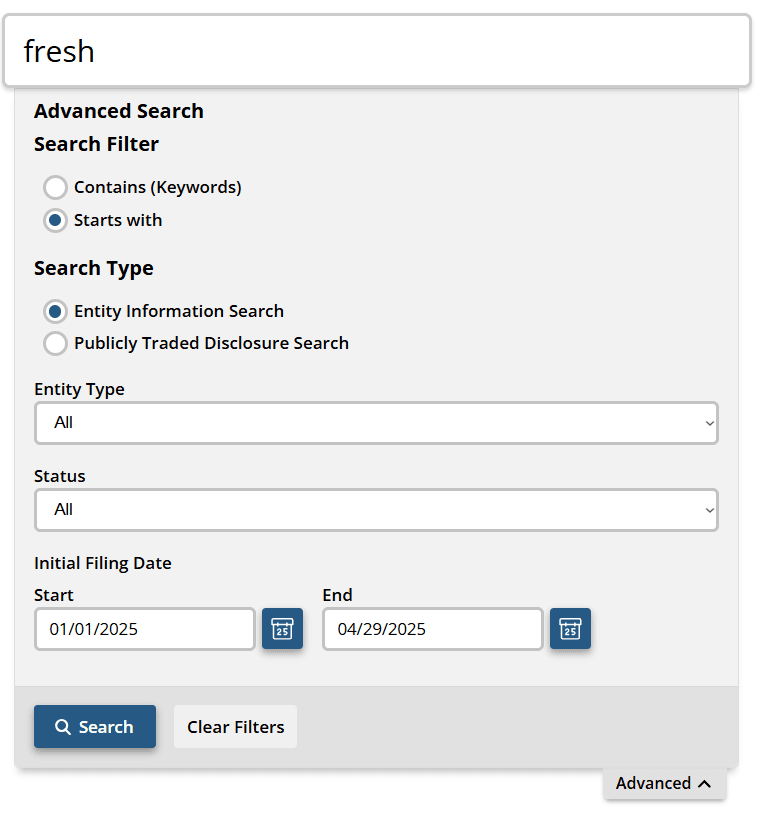
Step 3: Enter your criteria. Type a full or partial name, or an entity number. Use “starts with” when you know the first words. In Advanced, set the entity type and filing date range to narrow results.
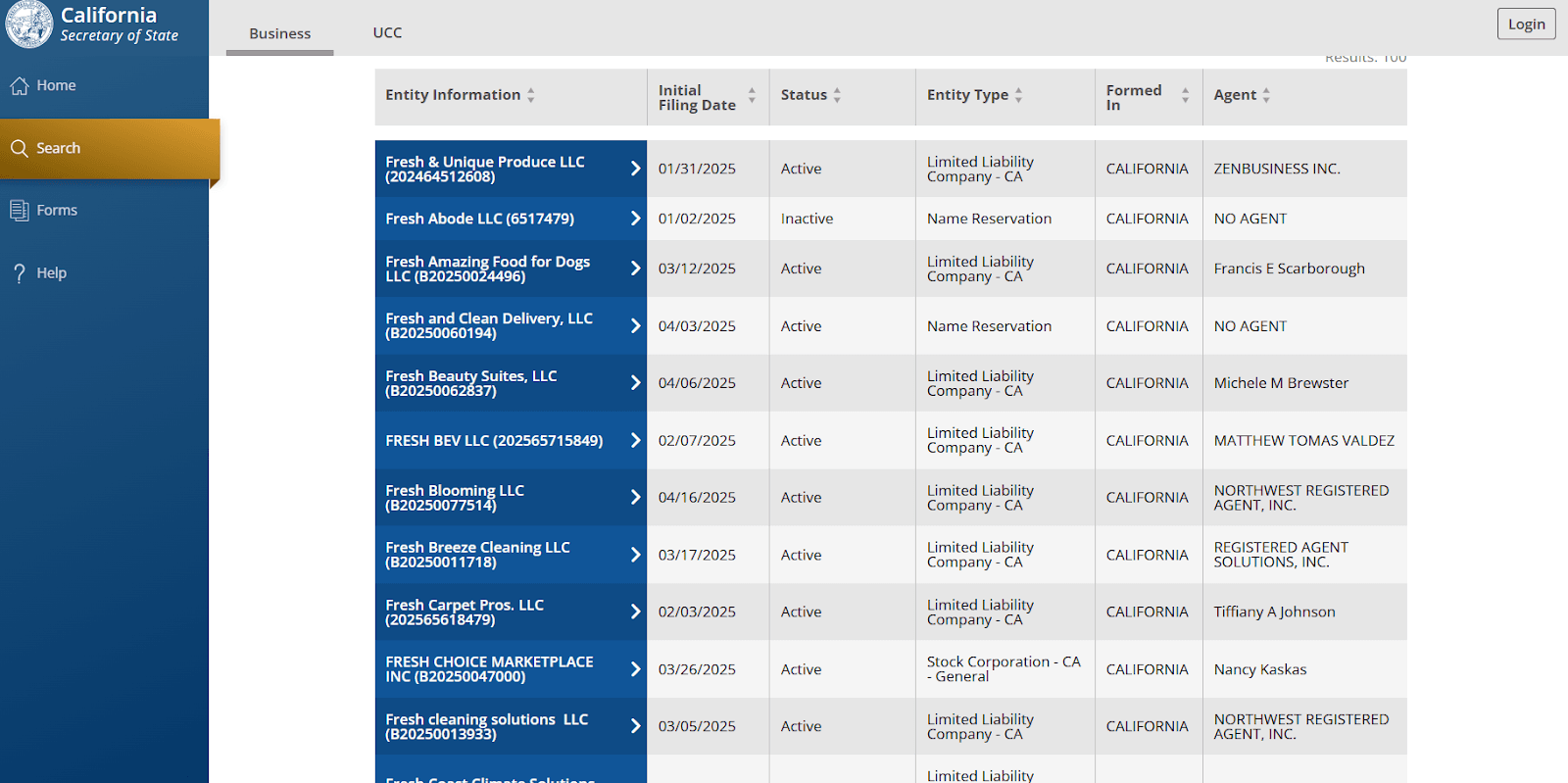
Step 4: Read the results table. The results list Entity Name, Entity Number, Initial Filing Date, Status, Entity Type, Formed In, and Agent for each match.
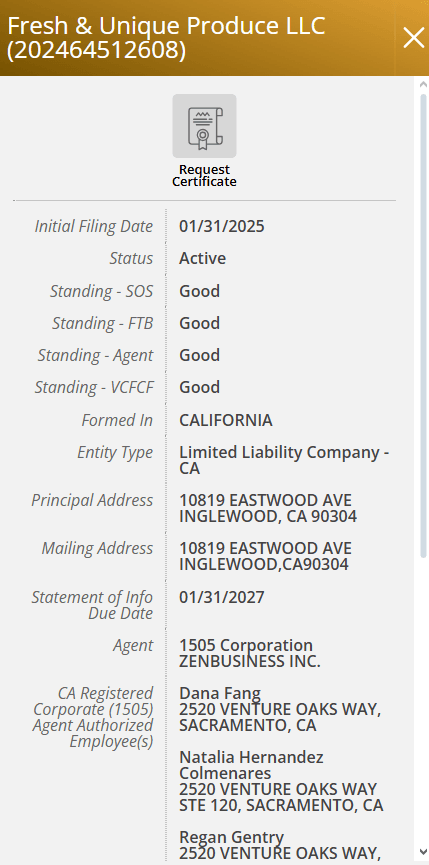
Step 5: Open the detail record. Click an entity to see its principal and mailing addresses, full filing history, registered agent, and free PDF images of the Articles and Statements of Information. A Request Certificate button orders a Certificate of Status.
How Do You Find Inactive or Dissolved Entities With Advanced Search?
Use the Advanced button and filter by Status, Entity Type, Search Type, and Initial Filing Date to surface dissolved, cancelled, surrendered, and merged-out records that a plain name search buries. A default name search leans toward active matches, so inactive entities are easy to miss.
This matters for real research. Predecessor entities, prior name history, and litigation targets often sit in inactive records. Setting Status to a specific value or Entity Type to a single structure pulls those buried records to the top.
How Do You Look Up a California Entity by Number?
Enter the entity number in the same search box. Newly registered corporations, LLCs, and LPs now receive a 12-character entity ID that starts with the letter “B,” per the California Secretary of State’s bizfile update. Older entities keep their legacy numbers, and both formats remain searchable.
| Era or entity type | ID format | Source |
|---|---|---|
| New corporations, LLCs, LPs | 12-character ID starting with “B” | CA SOS bizfile update |
| Legacy corporations | 7-digit number | California Secretary of State |
| Legacy LLCs | 12-digit “201…”-style number | California Secretary of State |
| General partnerships and LLPs | Numbering unchanged | CA SOS bizfile update |
You must include the “B” when searching for a newly formed entity, or the record will not resolve.
How Do You Check If a Business Name Is Available in California?
Search the exact name plus close variants. California requires a name that is “distinguishable in the records” of the Secretary of State, per its business entity name regulations. Punctuation, spacing, capitalization, articles, “&” versus “and,” and adding LLC or Inc. do not make a name distinguishable.
For example, “Golden Horizon LLC” and “Golden Horizons LLC” are likely too similar to clear. Corporations must carry a designator such as Incorporated, Corporation, or Corp.; LLCs must include Limited Liability Company, LLC, or L.L.C. Restricted words like “bank,” “trust,” and “insurance” need prior regulator approval before filing. This search checks state entity names only, so run a federal trademark check at USPTO.gov too.
You can verify availability instantly with Commenda’s company name checker before you commit to a filing.
Can You Reserve a Business Name in California?
Yes. A California name reservation holds your chosen name for 60 days for a filing fee, per the California Secretary of State. The state cannot grant the same applicant consecutive 60-day reservations, so at least one day must pass before you renew for the same name.
Which Entity Types Appear in the Search Results?
The search returns every state-registered structure. LLPs are the entry the old post got wrong: all partners share liability protection, and California restricts LLPs to five licensed professions.
| Entity type | Formation document | Liability | California note | Source |
|---|---|---|---|---|
| Stock corporation | Articles of Incorporation | Shareholders shielded | Files Statement of Information annually | California Secretary of State |
| Nonprofit corporation | Articles of Incorporation | Members and directors shielded | Files Statement of Information every 2 years | California Secretary of State |
| Professional corporation | Articles of Incorporation | Shielded, except own malpractice | For licensed professionals | California Secretary of State |
| LLC | Articles of Organization | Members shielded | $800 minimum tax plus LLC fee | California FTB |
| LP | Certificate of Limited Partnership | General partners unlimited; limited partners protected | Investment and real estate vehicles | Cal. Corp. Code §§ 15903.03, 15904.04 |
| LLP | Application to Register | All partners shielded from co-partner malpractice | Restricted to law, accountancy, architecture, engineering, land surveying | Cal. Corp. Code § 16101 |
| GP | Statement of Partnership Authority | Partners unlimited | Filing is optional | California Secretary of State |
| Foreign entity | Registration to do business | Per home-state type | “Formed In” shows the home state | California Secretary of State |
California limits LLPs to law, public accountancy, architecture, engineering, and land surveying, per Corporations Code § 16101. The architecture, engineering, and land-surveying eligibility sunsets on January 1, 2034, after which only accountancy and law remain, per the same statute.
What Do the Status Codes in a California Business Search Mean?
Status tells you whether the entity legally exists and can operate. The California Secretary of State defines 12 distinct status codes, and suspended entities lose liability protection and cannot enforce their contracts.
| Status | What it means | Source |
|---|---|---|
| Active | Meets SOS filing requirements and can operate | CA SOS status definitions |
| SOS Suspended/Forfeited | Failed to file the Statement of Information | CA SOS status definitions |
| FTB Suspended/Forfeited | Tax non-compliance with the Franchise Tax Board | CA SOS status definitions |
| SOS/FTB Suspended/Forfeited | Suspended by both agencies at once | CA SOS status definitions |
| Dissolved | Entity voluntarily ended | CA SOS status definitions |
| Canceled / SOS Canceled | Registration cancelled | CA SOS status definitions |
| Surrender | Foreign entity withdrew from California | CA SOS status definitions |
| Merged Out | Entity merged into another and no longer exists | CA SOS status definitions |
| Term Expired | Fixed-term entity reached its end date | CA SOS status definitions |
What Is the Difference Between FTB Suspended and SOS Suspended?
FTB suspension is a Franchise Tax Board (FTB) action for unpaid taxes or missing returns, including the $800 minimum franchise tax. SOS suspension is a Secretary of State action for failing to file the Statement of Information. They are different agencies with different cure paths, and one entity can carry both at once.
Both statuses carry the same consequences: contracts become voidable by the other party, the entity loses the exclusive right to its name, and owners face personal exposure. When the SOS suspends a corporation or LLC for a missing Statement of Information, the FTB adds a $250 penalty ($50 for domestic nonprofits), per the California Franchise Tax Board.
How Do You Reinstate a Suspended California Business?
The cure depends on which agency suspended you. For SOS suspension, file the delinquent Statement of Information and pay the penalty. For FTB suspension, file all missing returns, pay the outstanding balance and penalties, and submit an Application for Certificate of Revivor (Form FTB 3557) to the Franchise Tax Board.
An entity suspended by both agencies must satisfy both. Revivor is not instant, so allow processing time, then re-run the bizfile search to confirm the status has flipped back to Active before you rely on the entity for contracts or financing.
How Do You Verify a California LLC Is in Good Standing?
Check the Status field in bizfile: Active means the entity is in good standing with the Secretary of State. For formal proof that lenders, buyers, and other states require, order a Certificate of Status from bizfile.
One caveat matters. An SOS Active status does not guarantee the FTB shows the entity in good standing on tax. When the stakes are high, confirm both: an Active bizfile record and a clean FTB standing through an FTB Entity Status Letter.
How Do You Vet a Vendor or Partner With the Entity Search?
Before you sign, confirm the exact legal name, Active status, formation date, jurisdiction, and registered agent all match what the counterparty claims. A mismatch on any of these is a reason to pause the deal.
Pull the free filing PDFs to cross-check officers and addresses, and order certified copies when the deal size warrants official documents. Treat a suspended status as a stop sign: suspended entities cannot enforce contracts, so an agreement signed with one may be voidable against you.
What Filings Keep a California Entity in Good Standing?
California entities owe a Statement of Information (SOI) on a fixed cadence plus annual franchise tax. Stock corporations file the SOI every year; LLCs and nonprofits file every two years. The registered agent must stay current on file at all times.
| Obligation | Who owes it | Cadence or amount | Source |
|---|---|---|---|
| Statement of Information | Stock corporations | Annually | California Secretary of State |
| Statement of Information | LLCs and nonprofits | Every 2 years | California Secretary of State |
| Minimum franchise tax | Corporations, LLCs, LPs, LLPs | $800 per year | California FTB |
| C-corporation income tax | C corporations | 8.84% | California FTB tax rates |
| S-corporation franchise tax | S corporations | 1.5% | California FTB tax rates |
| LLC fee | LLCs | Additional fee tiered on California total income | California FTB |
| First-year minimum tax | Corporations formed on/after Jan. 1, 2020 | Exempt in first taxable year | California FTB |
Miss the Statement of Information and the SOS suspends you; miss the franchise tax and the FTB does. Both stop the entity from operating.
How Commenda Keeps Your California Entity Compliant
Commenda’s entity management platform tracks your Statement of Information deadlines, franchise tax dates, and registered agent details so your California entity never drifts into an SOS or FTB suspension. Forming a new company? Commenda’s incorporation service handles the filings and gets your first Statement of Information in on time.
Commenda connects to 100+ ERPs, APIs, and custom integrations, and its compliance calendar keeps every filing deadline in one place across entities and jurisdictions.
Book a demo to get a free compliance-status check on your California entities.