You are about to sign a contract, form an LLC, or vet a new partner, and you need one fact fast: is this Colorado business real and in good standing? Guessing is risky. File a name that already exists and your paperwork gets rejected. Sign with a delinquent entity and you inherit the problem.
The Colorado Secretary of State (SOS) runs a free Business Database Search that answers all of it. Use it to check name availability before filing, verify a company’s status before contracts, run due diligence on partners, and monitor your own entity’s compliance. This guide shows you how, what each result means, and what it costs.
What Is the Colorado Business Entity Search?
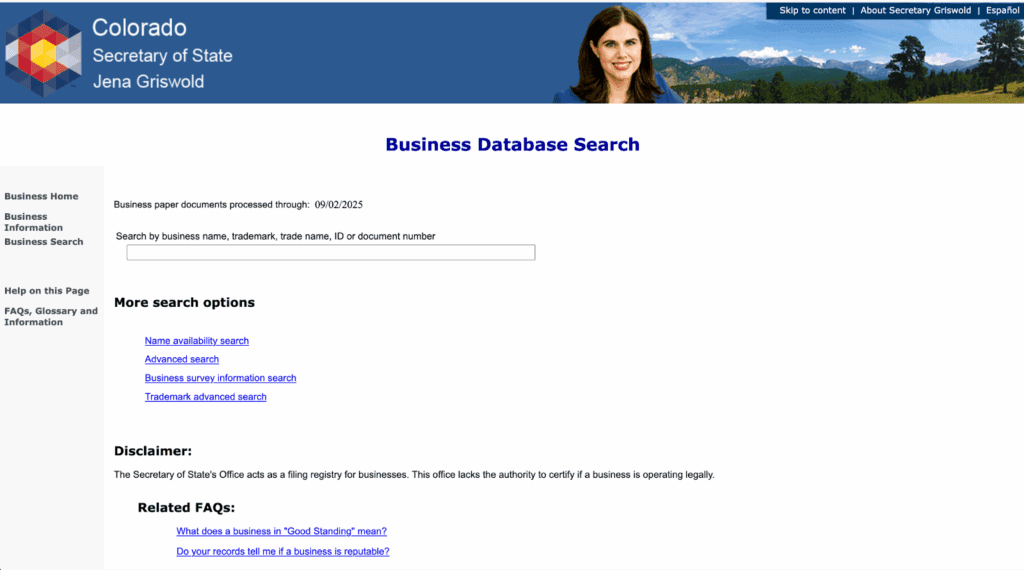
The Colorado business entity search is the Colorado Secretary of State’s free online Business Database Search. It covers every registered entity in the state, including LLCs, corporations, partnerships, and nonprofits, plus registered trade names and trademarks. You can search by business name, trademark, trade name, ID, or document number, all at no cost.
The office is candid about its limits. The search page states the SOS “acts as a filing registry for businesses” and “lacks the authority to certify if a business is operating legally,” per the Colorado SOS Business FAQs. A record proves an entity filed with the state, not that it is reputable or lawful.
| Feature | Detail | Source |
|---|---|---|
| Official tool name | Business Database Search | Colorado SOS search page |
| Cost to search and view documents | Free ($0) | Colorado SOS fee schedule |
| Current domain | coloradosos.gov, moved from sos.state.co.us on August 25, 2021 | Colorado SOS press release |
| Data currency | Online filings post immediately; paper filings processed through 06/25/2026 | Colorado SOS search page |
| Overseen by | Secretary of State Jena Griswold, 39th, in office since January 8, 2019 | Colorado SOS biography |
How Do You Do a Colorado Business Entity Search?
Go to the Colorado SOS Business Database Search, enter a business name, ID, or document number, review the results list, then open the entity record. The search is free and takes under a minute. The SOS advises searching by the unique ID number when you have it, an 11-digit number, because those searches “are faster and will give you better results,” per the Colorado SOS search tips.
Follow these steps:
- Open the Business Database Search on coloradosos.gov.
- Enter a business name, trade name, trademark, ID number, or document number.
- Review the results list and match the entity by ID and formation date.
- Open the entity record.
The record shows the entity name, 11-digit ID number, current status, formation date, principal office address, registered agent name and address, and the full filing history with downloadable documents.
Two tips save time. Use partial names and skip punctuation, since apostrophes and commas trip up exact matches. When names look alike, confirm the right one by ID number and formation date. Note the “Business paper documents processed through” date on the search page: online filings appear at once, but mailed paper filings lag behind that cutoff, currently 06/25/2026 per the Colorado SOS.
What Do Colorado Business Search Statuses Mean?
The status tells you whether an entity may legally operate and what it must fix. Good Standing is the only status that confirms an entity is current on filings and fees. Every other status flags a problem, from a missed report to full dissolution. Use the table below before you contract with or invest in any Colorado entity.
| Status | What it means | What to do next | Source |
|---|---|---|---|
| Good Standing | Registered and current on all filings and fees | Safe to proceed; download a certificate to confirm | Colorado SOS Business FAQs |
| Noncompliant / Delinquent | Missed a filing or fee, usually the periodic report | Confirm it files the overdue report before you rely on it | Colorado SOS Business FAQs |
| Dissolved (voluntary) | Owners filed dissolution and closed the entity | Treat as inactive; the entity no longer operates | Colorado SOS Business FAQs |
| Dissolved (administrative) | State dissolved it for noncompliance | Reinstatable; verify current status before contracting | Colorado SOS Business FAQs |
| Forfeited | Lost good standing for noncompliance, common for foreign entities | Do not transact until authority is restored | Colorado SOS Business FAQs |
| Withdrawn | Foreign entity filed to stop transacting in Colorado | Entity is no longer authorized in the state | Colorado SOS Business FAQs |
Is the Colorado Business Entity Search Free?
Yes. Searching the Business Database and viewing or printing filed documents costs nothing, and a Certificate of Good Standing or certified copy is also free from the Colorado SOS. Only new filings carry fees, and Colorado’s are among the lowest in the country. The table below lists current online fees from the Colorado SOS fee schedule, revised July 1, 2024.
| Filing or service | Online fee | Source |
|---|---|---|
| Business Database Search and viewing filed documents | Free ($0) | Colorado SOS fee schedule |
| Certificate of Good Standing / certified copies | Free ($0) | Colorado SOS fee schedule |
| LLC Articles of Organization | $50 | Colorado SOS fee schedule |
| Articles of Incorporation (corporation) | $50 | Colorado SOS fee schedule |
| Periodic report | $25 | Colorado SOS fee schedule |
| Late periodic report penalty | $50 | Colorado SOS fee schedule |
| Reinstatement | $100 | Colorado SOS fee schedule |
| Statement of Trade Name | $20 | Colorado SOS fee schedule |
| Reservation of Name (120 days) | $25 | Colorado SOS fee schedule |
Fees are subject to change without notice, so verify figures on the fee schedule before you file.
How Do You Check Name Availability in Colorado?
Use the SOS Name Availability Search, a separate tool from the general Business Database Search, to test whether a proposed name is distinguishable from existing records. It is built specifically to compare a new name against registered entities and trade names before you file. If the name clears here, you can move to your Articles of Organization or Articles of Incorporation.
Two cautions matter. “Available” is not trademark clearance, so run the SOS Trademark Advanced Search separately before you build a brand. If you are not ready to file, a Reservation of Name holds your chosen name for 120 days for $25, per the Colorado SOS fee schedule. Ready to file next? See our Colorado business registration guide.
How Do You Search a Trade Name (DBA) in Colorado?
Trade names register separately from entity names and are searchable through the Business Database Search’s trade name option. A trade name, also called a DBA (doing business as), is any name a business uses that differs from its legal name. Sole proprietors and general partnerships operating under a name other than the owner’s must register one, and that filing costs $20 per the Colorado SOS fee schedule.
This is also how otherwise-unregistered sole proprietors appear in the database at all. A sole proprietor with no filed trade name leaves no record in the search, so an empty result does not always mean no business exists.
How Do You Verify a Registered Agent in Colorado?
Open the entity record and read the registered agent section. It lists the agent’s name and physical Colorado street address, so you can confirm who the agent of record actually is. Every Colorado entity must maintain a registered agent with a Colorado street address, per the SOS, and that agent receives legal and state notices on the entity’s behalf.
Watch for outdated agent information. A resigned agent, a stale address, or frequent agent changes in the filing history can signal a neglected entity. A mismatch between the agent on record and the person you are dealing with is a reason to slow down before signing.
How Do You Order a Certificate of Good Standing in Colorado?
Order or download it directly from the entity’s page in the search results, at no charge, per the Colorado SOS fee schedule. A Certificate of Good Standing proves an entity exists and is current on its filings. You typically need one to open a bank account, qualify to do business in another state (foreign qualification), secure financing, or close a merger or acquisition (M&A) deal.
Do not confuse it with a Certificate of Incorporation or Formation. That is the original formation document proving the entity was created, and you download it from the filing history on the same entity page. The good standing certificate speaks to current compliance; the formation document speaks to origin.
When Is the Colorado Periodic Report Due?
Annually, within a window around the entity’s anniversary month of formation. Colorado’s periodic report is the equivalent of other states’ annual report. Miss it and the entity turns Noncompliant/Delinquent, and continued failure leads to administrative dissolution. The SOS emails a reminder when an address is on file, but the deadline stands regardless.
The report costs $25 online, up from $10 effective July 1, 2024 under Senate Bill 23-276, per the Colorado SOS fee announcement. Even after the increase, the SOS notes Colorado is among only 10 states charging $25 for annual business renewal, against a national average above $58. File on time and skip the $50 late penalty.
How Do You Reinstate an Administratively Dissolved Colorado LLC?
File Articles of Reinstatement online through the SOS and pay the fee; the search is where you confirm the dissolved status first. Reinstatement costs $100 online, plus any overdue periodic report at $25 and its $50 late penalty, per the Colorado SOS fee schedule. Filing restores the entity to Good Standing and reclaims its name.
Not reinstating carries real cost. Once dissolved, the entity loses protection of its name, so another business can register it. Owners who keep operating a dissolved entity can also lose the liability shield the LLC was meant to provide, exposing personal assets.
Does Colorado Have a Statewide Business License Lookup?
No. Colorado has no general statewide business license, so the SOS entity search will never show one. Licensing happens at the city and county level and through industry agencies, so the record you find in the Business Database Search confirms registration, not licensing. Checking one does not check the other.
Two agencies handle most state-level licensing. The Department of Regulatory Agencies (DORA) licenses regulated professions, and the Colorado Department of Revenue issues sales tax licenses. For the full picture, read our Colorado business license guide, which maps which licenses apply where.
Can You Use the Search for Business Due Diligence?
Yes, as the first step. It verifies that an entity exists, its formation date, principal office address, registered agent of record, current status, and full filing history, which together show who controls the entity’s registered presence. Start every counterparty check here before you rely on anyone’s word.
Then respect the limits. Colorado records do not list owners or members, and per the SOS disclaimer the office cannot certify a business operates legally or is reputable. Beneficial ownership now sits in federal Beneficial Ownership Information (BOI) reports filed with the Financial Crimes Enforcement Network (FinCEN), not the state database. Confirm current requirements at FinCEN’s BOI page, and supplement with local license checks and court records.
How Commenda Keeps Your Colorado Entity in Good Standing
Colorado makes searching easy, but staying in Good Standing is on you. A missed periodic report turns an entity Delinquent, and continued lapses end in administrative dissolution. Commenda’s entity management platform handles formation filings, registered agent service, and compliance deadline tracking, so your periodic reports never lapse into delinquency across Colorado or any state where you operate.
Forming a new Colorado entity from scratch? Commenda’s incorporation service files your Articles of Organization or Articles of Incorporation and sets up compliance from day one. Everything follows the same standardized workflow, so entity number 12 behaves exactly like entity number 1.
Book a demo to get a free compliance status check on your Colorado entities and confirm every one is in Good Standing.