You need to confirm a business name is free, vet a counterparty before you sign, or check your own company’s standing with the state. All three start in the same place. The Georgia Secretary of State’s Corporations Division runs a free public entity search at ecorp.sos.ga.gov/BusinessSearch. It is the authoritative source, and it needs no account and no payment.
This guide covers all three jobs: checking name availability, running due diligence, and verifying registration status.
What Is a Georgia Business Entity Search?
A Georgia business entity search queries the official state business registry maintained by the Georgia Secretary of State, Corporations Division. It confirms whether a name is available, an entity’s legal status, its registered agent, its formation date, and its filing history, including downloadable documents. It covers only state-registered entities such as corporations, limited liability companies (LLCs), and partnerships.
| Fact | Detail | Source |
|---|---|---|
| Search portal | ecorp.sos.ga.gov/BusinessSearch | GA SOS Corporations Division |
| Cost to search | Free, no account required | GA SOS Corporations Division |
| Search criteria | Business Name, Control Number, Registered Agent Name, Officer Name | GA SOS eCorp portal |
| Control number format | 8-digit numeric identifier | GA SOS certified filings |
| Current Secretary of State | Brad Raffensperger (term through Jan. 11, 2027) | GA SOS official bio |
| Annual registration window | January 1 to April 1 | Ga. Comp. R. & Regs. 590-7-22 |
The registry is kept by the Corporations Division of the Georgia Secretary of State’s Office, which serves as custodian of business filings and issues certified copies. The current Secretary of State is Brad Raffensperger, whose term runs through January 11, 2027, per the official Secretary of State bio.
Is the Georgia Business Entity Search Free?
Yes. Searching the Georgia business entity database is 100% free, and you do not need an account. You create an account only when you want to file a document, such as a formation or an annual registration. Viewing an entity’s filing history is also free. Certified copies of documents require a separate paid order through the Secretary of State.
How Do You Search for a Georgia Business Entity Online?
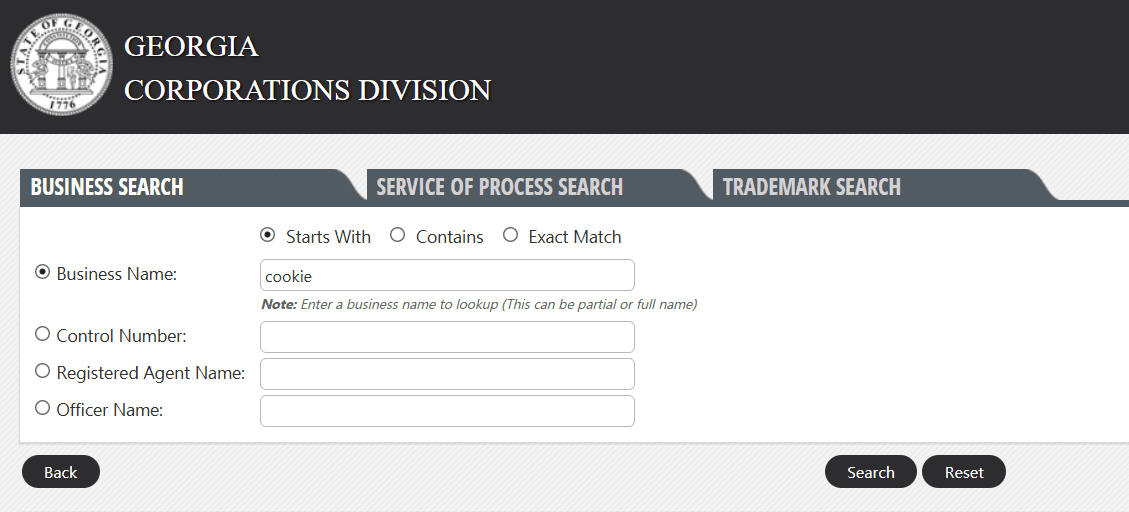
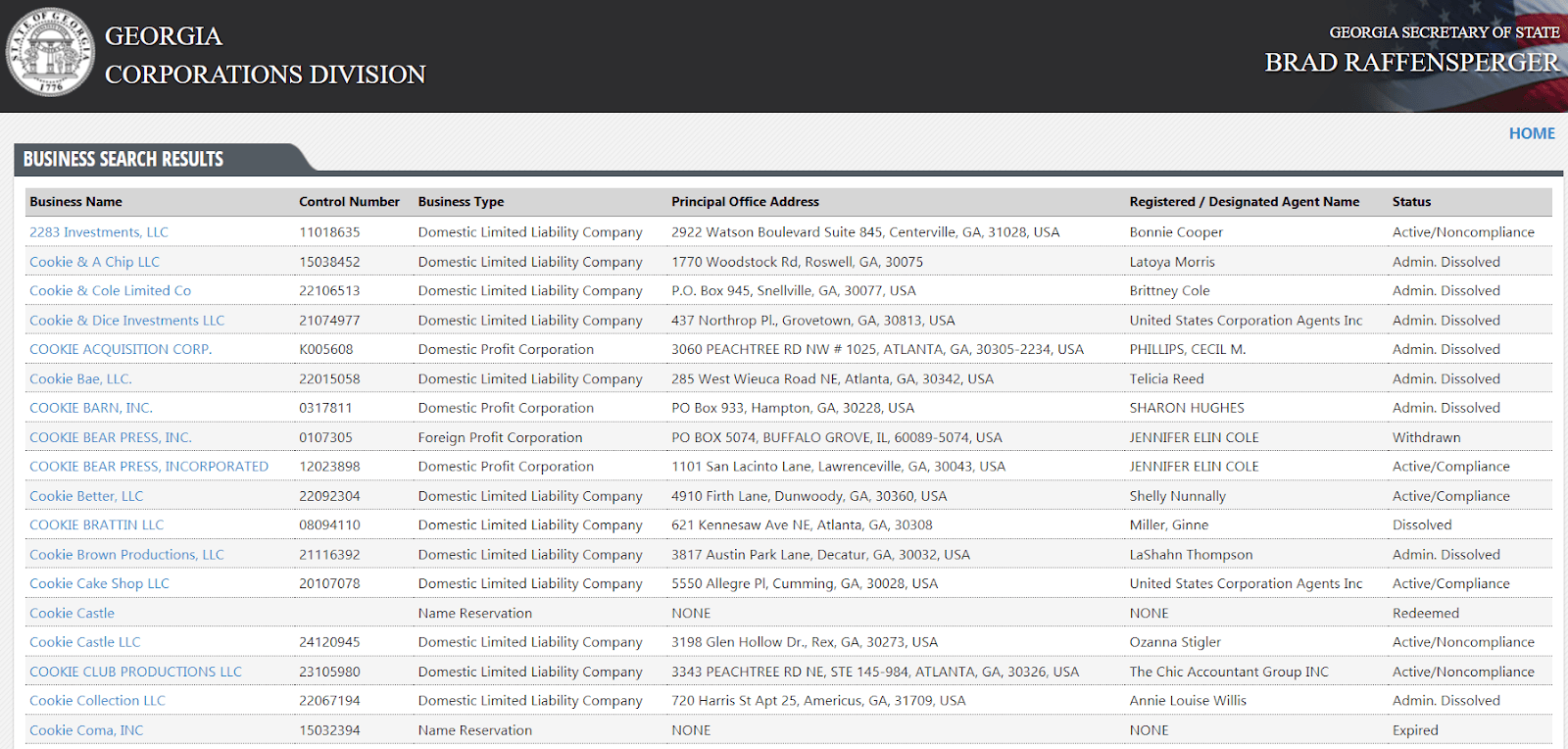
Go to ecorp.sos.ga.gov/BusinessSearch, pick a search criterion, choose a match type, and click Search. The portal offers four criteria: Business Name, Control Number, Registered Agent Name, and Officer Name. It offers three match modifiers: Starts With, Contains, and Exact Match. Results list each entity’s name, control number, type, principal office address, registered agent, and status.
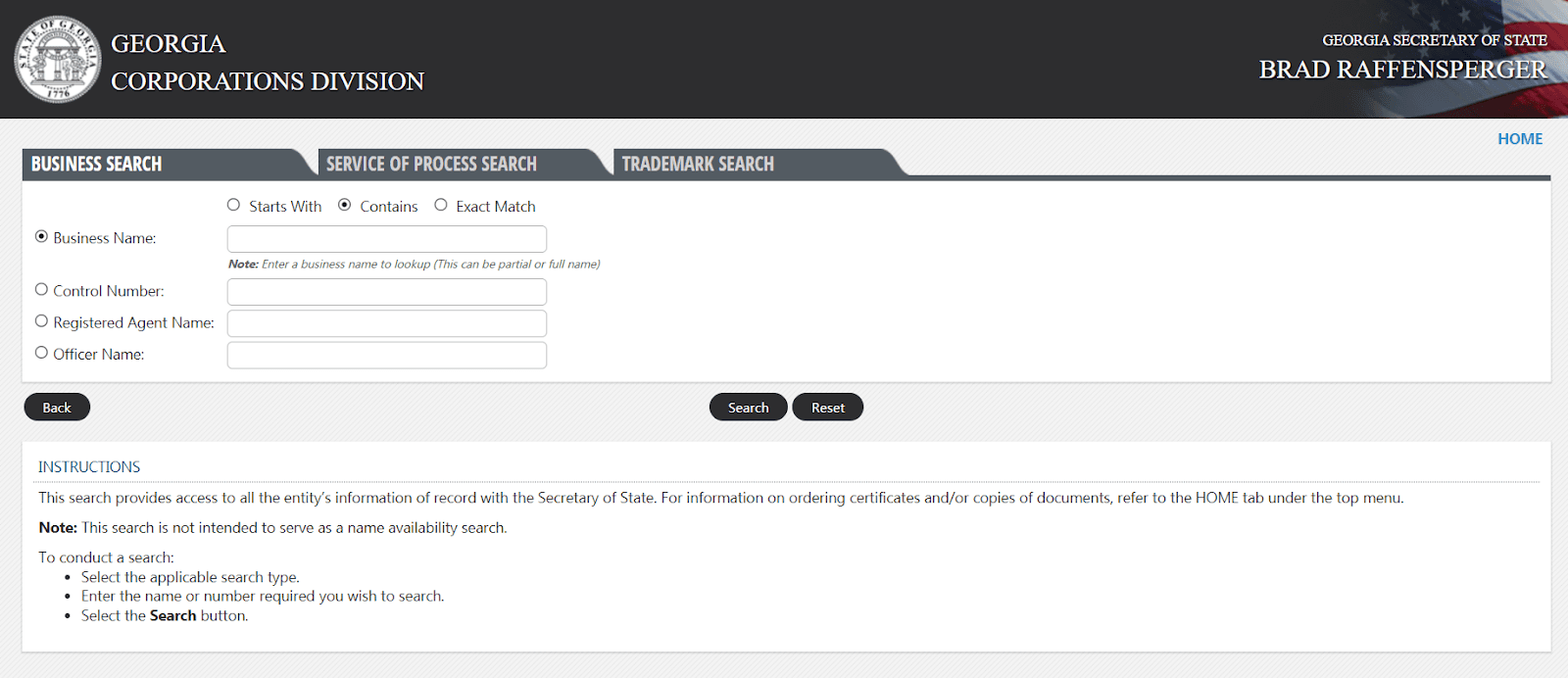
Use Business Name with Contains for the broadest results. Switch to Starts With to narrow, or Exact Match when you know the exact registered name.
Click any result to open the entity’s detail page, where the status, filing history, and documents live.
How do you search by control number?
Search by control number when you have the entity’s exact 8-digit identifier and want the precise record. Georgia assigns each registered entity an 8-digit numeric control number, confirmed on the state’s own certified filings (for example, 17120297 and 21056740). Find yours on your formation certificate, annual registration notices, or Secretary of State correspondence. The older “12-digit” claim is inaccurate.
How do you search by registered agent or officer name?
Search by registered agent or officer name to find every entity tied to one person. The Registered Agent Name search shows who accepts service of process for an entity. The Officer Name search supports due diligence by surfacing entities linked to an individual. Its limit: only officers actually listed in filings appear, and data completeness varies by entity.
How Do You Check If a Business Name Is Available in Georgia?
Search your core words using Contains, then Starts With, and scan for near matches. Georgia requires a name to be “distinguishable upon the records” of the Secretary of State. Minor differences rarely count. “Peachtree Solutions LLC” and “Peachtree Solutions Inc.” are treated as too similar, because swapping a suffix does not make a name distinguishable.
Names must also meet structural rules. An LLC name must include “LLC” or “Limited Liability Company.” A corporation name must include “Corporation,” “Incorporated,” “Company,” “Limited,” or an abbreviation. Availability on the state registry is not trademark clearance, so run a search at the United States Patent and Trademark Office (USPTO) too.
If the name is free, reserve it for 30 days for $25 filed online, per the official name reservation form. The reservation cannot be renewed. Commenda’s company name availability checker helps you screen a name before you file.
How Do You Verify a Georgia Business’s Registration Status?
Open the entity’s detail page and read the Status field. It shows a live status the state updates as filings and fees are processed. The status tells you whether the entity is in good standing, behind on fees, or dissolved, which is the single most important field for anyone relying on that entity.
| Status | What it means | Action it signals |
|---|---|---|
| Active/Compliance | Filings and fees are current | Safe to transact |
| Active/Noncompliance | Annual registration or fees overdue; pending dissolution | Resolve before relying on it |
| Admin. Dissolved | State dissolved it for failure to file | Must reinstate to restore rights |
| Dissolved | Voluntarily wound down | No longer operating |
| Withdrawn | Foreign entity ended Georgia authority | No longer registered in Georgia |
| Terminated | Registration ended | No longer active |
Source for all statuses: GA SOS eCorp portal.
Every corporation, LLC, and foreign entity must file an annual registration between January 1 and April 1 each year, per Georgia rule 590-7-22. Miss it, and the entity moves to noncompliance, then to administrative dissolution.
What Happens If Your Entity Is Administratively Dissolved?
Administrative dissolution strips your entity of good standing, its liability protection for owners, and its exclusive right to its name. The state dissolves an entity that fails to file its annual registration. Reinstatement is available: you file all delinquent annual registrations and pay the outstanding fees, including the late penalty. The Business Division FAQ describes the reinstatement process.
Georgia charges a $25 penalty for a late annual registration, per the current fee schedule. Fees are non-refundable, so confirm each amount before filing.
How Do You Run a Due Diligence Search on a Georgia Business?
Pull the entity’s status, formation date, registered agent, and filing history before you sign anything. The status confirms good standing. The formation date confirms operating history. The registered agent shows who accepts legal notices. The filing history shows amendments and lapses. Together these fields reveal whether the entity is what it claims to be.
One caveat matters most. Sole proprietors and general partnerships without a registered trade name do not appear in the state search. A “doing business as” (DBA) trade name in Georgia is filed at the county Clerk of Superior Court, not with the Secretary of State. The state search will miss county-level DBAs, so check the relevant county for those.
How Do You Look Up Articles of Incorporation and Other Filings?
Open the entity’s filing history on its detail page and download filed documents free. Available filings include the Articles of Incorporation or Articles of Organization, annual registrations, and amendments. Downloaded copies are free to view. Certified copies, which banks and courts often require, need a separate paid order through the Secretary of State’s Corporations Division.
Which Business Entity Types Appear in the Georgia Search?
State-registered entities appear: corporations, LLCs, and partnerships. Unregistered sole proprietors and general partnerships do not, unless they hold a county trade name. Here is how each type files and appears.
| Entity type | Formation document | Name requirement | How it appears |
|---|---|---|---|
| Corporation (C or S) | Articles of Incorporation | “Corporation,” “Incorporated,” “Company,” “Limited,” or abbreviation | S-corp is a tax election, not a filing; shows as a corporation, never “S-corp” |
| Nonprofit corporation | Articles of Incorporation | None specified | Listed as nonprofit |
| Professional corporation (PC) | Articles of Incorporation | Licensed professionals | Shows as a corporation |
| Limited liability company (LLC) | Articles of Organization | Must include “LLC” or “Limited Liability Company” | Most common new filing |
| Limited partnership (LP) | Certificate of Limited Partnership | None specified | Shows as an LP |
| Limited liability partnership (LLP) | Statement of qualification | Licensed professional context | Shows as an LLP |
| Sole proprietor / general partnership | None at state level | None | Does not appear unless a county DBA is registered |
Source: GA SOS Corporations Division filing guidance.
What Do Georgia Business Filings Cost?
The search is free, but filings carry fees set by the current Corporations Division fee schedule, effective September 6, 2025.
| Filing | Fee | Source |
|---|---|---|
| Articles of Organization (LLC) | $100 online / $110 by mail | GA SOS fee schedule (Rev. 8/2025) |
| Articles of Incorporation | $110 total (online and paper) | GA SOS fee schedule (Rev. 8/2025) |
| Annual registration (for-profit corp, LLC, LP, LLLP) | $60 total ($50 fee + $10 service charge), same online or paper | GA SOS fee schedule (Rev. 8/2025) |
| Annual registration (nonprofit) | $40 total ($30 fee + $10 service charge) | GA SOS fee schedule (Rev. 8/2025) |
| Late annual registration penalty | $25 | GA SOS fee schedule (Rev. 8/2025) |
| Name reservation (30 days) | $25 online / $35 by mail | GA SOS fee schedule (Rev. 8/2025) |
| Expedited processing | +$120 (2 business days) / +$275 (same day) / +$1,200 (1 hour) | GA SOS fee schedule (Rev. 8/2025) |
The prior schedule gave online Articles of Incorporation a $10 discount over paper. The September 2025 update set both at $110. Online filings must be paid by credit card, and mailed filings by check or money order, per the same schedule.
How Commenda Helps You Stay Compliant in Georgia
The search tells you where an entity stands today. Commenda’s entity management platform keeps it there. It tracks your Georgia annual registration deadline, manages your registered agent and filings, and monitors status across every state and country you operate in, from one dashboard instead of scattered spreadsheets and portals.
Pair it with Commenda’s compliance calendar to see every filing deadline by entity and jurisdiction, and the company name availability checker before you form your next entity.
Book a demo for a walkthrough of getting every Georgia filing deadline tracked automatically, so you never watch an entity slide into noncompliance again.