You need to confirm a name is free before you file, or confirm a company is real before you sign. The Indiana business entity search does both. It is a free Indiana Secretary of State (SOS) tool at the public business search, and no account is needed to search.
The tool is official and open to anyone. You search by name, ID, registered agent, or governing person, then click any record for the full filing detail. The parameters, status values, and identifier tables below tell you exactly what each result means.
What Is the Indiana Business Entity Search?
The Indiana business entity search is the state’s official public database of registered businesses, operated by the Indiana Secretary of State (SOS). Its front end is INBiz, the SOS one-stop business portal at inbiz.in.gov. “INBiz business entity search” and “Indiana Secretary of State business entity search” name the same free tool.
INBiz is run by the SOS with the Department of Revenue and the Department of Workforce Development. The State of Indiana reports the portal has surpassed 500,000 active users. Anyone can search records for free; an INBiz account is only required to file documents.
How Do You Perform an Indiana Business Entity Search?
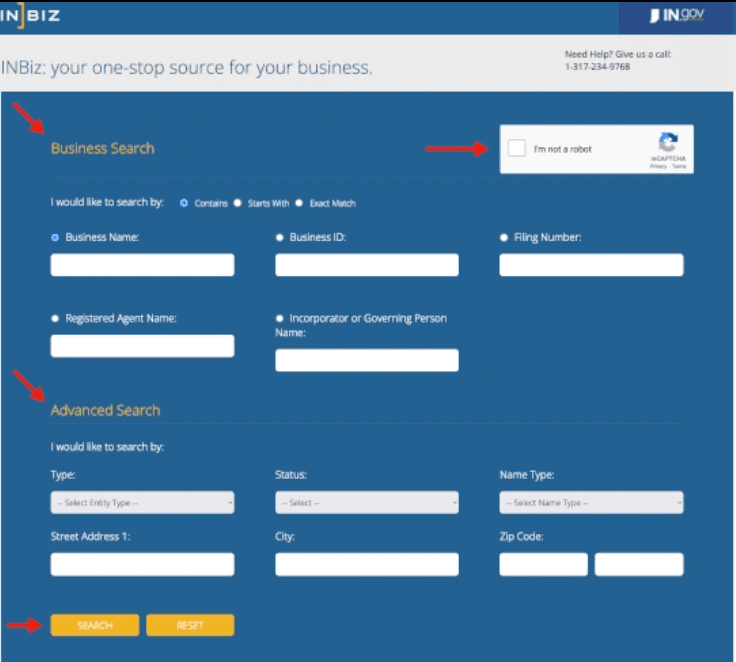
Open the Indiana SOS public business search, enter a search term, pick a match type, and select Search. Review the results table, then click a Business ID to open the full entity record. From that record you can order certified documents. No login is required to search, per the Indiana SOS.
The five steps stay simple:
- Visit the SOS public business search page.
- Enter your search criteria (name, Business ID, filing number, registered agent, or governing person).
- Review the results table.
- Click a Business ID to open the entity detail page.
- Order official documents if you need them.
| Search parameter | Available options | Source |
|---|---|---|
| Match types | Contains, Starts With, Exact Match | Indiana SOS public business search |
| Searchable fields | Business name, Business ID, filing number, registered agent name, incorporator/governing person | Indiana SOS public business search |
| Narrowing filters | Entity type, status, name type, street address, city, ZIP code | Indiana SOS public business search |
How Do You Check If a Business Name Is Available in Indiana?
Run an Exact Match search on your proposed name. If the tool returns “No data found,” the name is likely available. Indiana requires each entity name to be distinguishable from names already on file and to carry the correct designator, such as LLC or Inc. You can reserve an available name for 120 days.
Indiana disregards entity-type words when testing whether a name is distinguishable, per Ind. Code 23-0.5-3-1. So “Acme LLC” and “Acme Inc.” are not distinguishable from each other. Each entity type has its own required designator.
| Entity type | Required name designator | Source |
|---|---|---|
| LLC | “limited liability company,” “L.L.C.,” or “LLC” | Ind. Code 23-0.5-3-2 |
| Corporation | “corporation,” “incorporated,” “company,” or “limited” (or Corp., Inc., Co., Ltd.) | Ind. Code 23-0.5-3-2 |
| Limited partnership | “limited partnership” or “L.P.” | Ind. Code 23-0.5-3-2 |
| Limited liability partnership | “limited liability partnership,” “L.L.P.,” or “LLP” | Ind. Code 23-0.5-3-2 |
If you are not ready to file, reserve the name through INBiz for $10 for a renewable 120-day period, per the INBiz fee calculator and Ind. Code 23-0.5-3-3. A clear search result is not a trademark clearance, so run a separate USPTO check before you commit. When the name is free, you can move to registering your Indiana business.
How Do You Verify an Indiana Business Is Active Before Signing a Contract?
Search the exact name or the Business ID, then read the Status column in the results. Open the detail record to confirm the registered agent, the principal office, and the filing history. Check that the entity’s Business Entity Reports are current. Match the agent and address against what the counterparty told you.
If a company operating in Indiana does not appear at all, it may be operating unregistered, which is a risk flag. A foreign entity should appear with a foreign designation once it registers to do business in the state.
What Do the Indiana Entity Status Values Mean?
The Status column tells you whether an entity is current, closed, or terminated. Read it before you rely on any record.
| Status | What it means | What to do | Source |
|---|---|---|---|
| Active | Entity is current on its Business Entity Reports and has a valid registered agent | Proceed, then confirm good standing separately | Indiana SOS registered agent/status FAQ |
| Inactive / Dissolved | Voluntarily dissolved or closed | Treat as not operating | Indiana SOS public business search |
| Administratively Dissolved | SOS terminated it, usually for missed Business Entity Reports or no registered agent | Verify reinstatement before relying | INBiz Business Entity Report |
| Revoked | Authority to operate revoked for noncompliance | Do not rely on it | Indiana SOS public business search |
| Withdrawn | Foreign entity ended its Indiana registration | Confirm current home-state status | Indiana SOS public business search |
| Pending | Filing is in process | Recheck shortly | Indiana SOS public business search |
Does “Active” Status Mean the Business Is in Good Standing?
No. Active on INBiz is not the same as certified good standing. An entity can show Active while carrying compliance problems that a status label does not surface. To prove true good standing, order a Certificate of Existence through INBiz.
The Certificate of Existence costs $21.42 through INBiz, per the Indiana SOS Certificate of Existence alert. Only the Indiana Secretary of State issues it, and it is emailed within minutes. Banks and other states often require it for accounts, financing, and foreign qualification.
What Is the Difference Between a Business ID, a Filing Number, and an EIN?
The Business ID identifies the entity, the filing number identifies one document, and the Employer Identification Number (EIN) is a federal tax number that never appears in the state search. Readers often confuse the three.
| Identifier | What it is | Searchable on INBiz? | Source |
|---|---|---|---|
| Business ID | SOS-assigned entity identifier, shown in results | Yes | Indiana SOS public business search |
| Filing Number | Tied to one specific filing or document | Yes | Indiana SOS public business search |
| EIN | Federal tax ID issued by the IRS | No | Internal Revenue Service |
Which Entity Types Appear in the Indiana Search?
The search covers formally registered entities: LLCs, corporations, partnerships, and their foreign versions. Sole proprietorships do not appear because they never register with the SOS.
| Entity type | Note | Source |
|---|---|---|
| Limited liability company (LLC) | Most common new formation | INBiz business entity types |
| Domestic for-profit corporation | Files Articles of Incorporation, can issue stock | INBiz business entity types |
| Nonprofit corporation | Public benefit, mutual benefit, or religious | INBiz business entity types |
| Limited liability partnership (LLP) | Common for professional service firms | INBiz business entity types |
| Limited partnership (LP) | General and limited partners | INBiz business entity types |
| Professional corporation (PC) | Licensed professionals, plus licensing-board rules | INBiz business entity types |
| Benefit corporation | Recognized in Indiana | INBiz business entity types |
| Foreign entity | Formed elsewhere, registered to operate in Indiana | INBiz business entity types |
Two gaps to know. Sole proprietorships never register with the SOS, so they return nothing. Assumed business names (DBAs) for sole proprietors and general partnerships are often filed at the county recorder, so a state search can miss them.
Can You Search Indiana Businesses by Registered Agent?
Yes. Registered agent name is a first-class search field on INBiz. You can search by an agent’s name to find every entity that agent represents, or confirm who a specific company uses. Every Indiana entity must maintain a registered agent with a physical Indiana street address.
The agent’s name and address appear in the results table and again on the entity detail page. This reverse search is genuinely useful for mapping related entities and is a feature competitor guides rarely mention.
What Does the Entity Detail Page Show?
Clicking a Business ID opens the full record, well beyond the results table. It shows the creation date, filing history, Business Entity Report history and due dates, the registered agent address, the principal office, governing persons, name history, and document ordering.
From that page you can order certified copies and a Certificate of Existence. Most competitor guides stop at the results table, so this is where the official record earns its trust. Confirm the current fields with a live search before you rely on any one item.
What Should You Do After Your Indiana Entity Search?
Your next step depends on whether you are forming a business or checking one. New founders move toward formation; anyone doing due diligence pulls the official proof.
If you are forming: reserve the name or file your Articles of Organization or Incorporation on INBiz, then register for state taxes using the Business Tax Application (BT-1) with the Indiana Department of Revenue, and secure any required licenses. If you are verifying an existing business: order certified documents, confirm the registered agent, and review the Business Entity Report history. Reports are filed biennially, at $32 online or $50 by mail, per the INBiz Business Entity Report page.
How Commenda Helps After Your Indiana Entity Search
The search tells you where an entity stands today. Commenda’s entity management platform keeps it that way: formation, registered agent service, Business Entity Report deadlines, and compliance tracking in one place. That is certainty of process, so country 12 behaves like country 1.
Confirm a name is free before you file with the Commenda company name checker, and never miss a biennial report with the Commenda compliance calendar, which surfaces every filing by entity and jurisdiction.
Book a demo to get a free compliance-status review of your Indiana entities and see exactly what needs filing next.