You need to verify a Kansas company or confirm a business name is free before you file your formation paperwork. The Kansas Secretary of State (KSOS) runs a free public tool for exactly that: the Business Entity Search Station (BESS). It returns registration status, entity IDs, and filing history for every business on record with the state.
This guide shows how to run a Kansas business entity search, read the results, and turn what you find into your next compliance step. Secretary of State Scott Schwab’s office maintains the database, per the KSOS Businesses page.
What Is the Kansas Business Entity Search?
The Kansas business entity search is the free public lookup of every business registered with the Kansas Secretary of State. You use it to verify a registration, check an entity’s status, confirm name availability, and research counterparties before you sign, lend, or invest. Formation filers, lenders, and due diligence teams all rely on it.
| Fact | Detail | Source |
|---|---|---|
| Official tool | Business Entity Search Station (BESS) | sos.ks.gov BESS |
| Cost | Free to search | KSOS BESS |
| Search methods | Business name, entity ID number, resident agent name | KSOS BESS |
| Office | Kansas Secretary of State (Scott Schwab) | KSOS Businesses page |
| Name reservation | $30 online / $35 paper, 120 days, non-renewable | K.S.A. 17-7923 |
| Periodic filing | Biennial information report (not annual) | HB 2391 (2021) |
How Do I Do a Kansas Business Entity Search? (Step by Step)
Open BESS, choose a search method, run the search, then open the entity record. The whole process is free and takes under a minute. BESS records reflect filings as KSOS processes them, not instantly. Online filings process in about 24 hours and mailed filings in 3 to 5 business days, per LLC University’s Kansas guide.
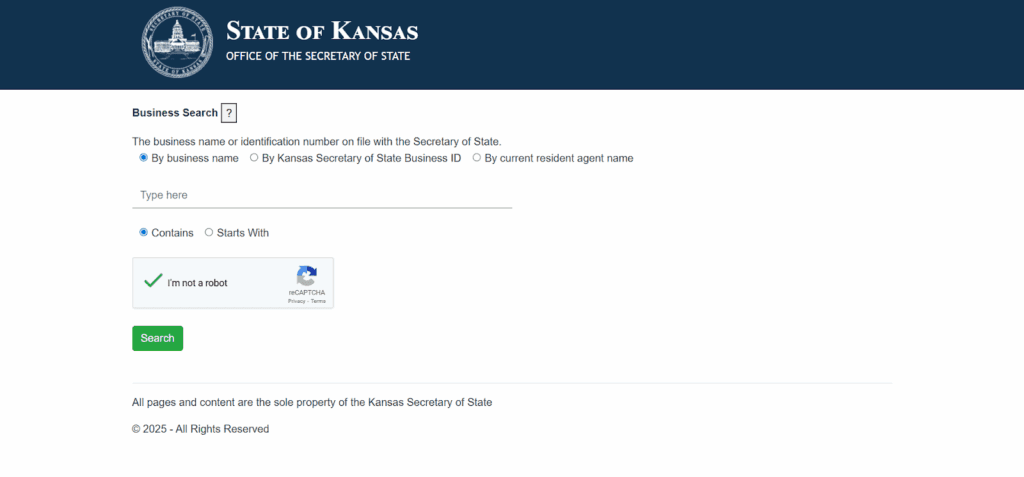
- Go to the Kansas Business Entity Search Station.
- Pick one of the three search methods below.
- Enter your term, clear the reCAPTCHA, and select Search.
- Choose “Select Business” on any result to open its full record.
How Do You Search by Business Name?
Type the business name and choose “Starts With” or “Contains.” “Starts With” narrows results to names beginning with your term, which works when you know the exact legal name. “Contains” catches every name that includes your keyword, which is better for broad research and catching close variants. Drop punctuation and designators like LLC (limited liability company) or Inc. for wider matches.
How Do You Search by Entity ID Number?
Enter the Kansas entity ID number, the identifier KSOS assigns to each registered business at formation. It is unique to that entity and appears at the top of every filed document, so it returns a single exact record with no name-spelling guesswork. It is not the same as a federal Employer Identification Number (EIN).
How Do You Search by Resident Agent Name?
Enter the resident agent’s name to find every entity that agent represents. Kansas uses the term “resident agent” for what other states call a registered agent, and the field is public in BESS, per the KSOS search tool. This search helps map related companies served by the same commercial agent.
What Do Kansas Entity Search Results Show?
Search results list the business name, entity ID, entity type, status, and formation date. The detail page adds the resident agent, registered office address, and filing history. File-stamped copies of every filed document are free to view and print online through the KSOS Copies & Certifications portal.
The search does not show ownership. Member and shareholder lists, EINs, and tax records never appear in a Kansas entity record. Kansas files the certificate of formation as the public record, so owners and internal governance stay private. Confirm exact field labels on any live record before you rely on them.
What Do Kansas Business Entity Statuses Mean?
The status field tells you whether an entity is compliant and safe to transact with. Active or In Good Standing is clean; Forfeited and Delinquent are warning signs. Confirm the exact label on the live record, since KSOS displays the precise term for each entity.
| Status | What it means | Due diligence signal |
|---|---|---|
| Active / In Good Standing | Registered and current on filings | Safe to transact |
| Delinquent | Missed the information report due date | Caution; forfeiture pending |
| Forfeited | Administratively dissolved for non-filing | Cannot file until reinstated (K.S.A. 17-7510) |
| Dissolved | Voluntarily closed | No longer operating |
| Cancelled | Foreign entity withdrew or lost authority | Not authorized in Kansas |
Which Entity Types Appear in a Kansas Business Search?
BESS covers every entity registered with KSOS, both domestic and foreign. That includes LLCs, corporations, limited partnerships, limited liability partnerships, nonprofits, and professional entities. Sole proprietorships do not register and do not appear. Nonprofits use the same tool, so there is no separate Kansas nonprofit database.
| Entity type | Registers with KSOS | Notes |
|---|---|---|
| Limited Liability Company (LLC) | Yes | Single- and multi-member |
| Corporation | Yes | C-corp, S-corp, domestic and foreign |
| Limited Partnership (LP) | Yes | Registers to form |
| Limited Liability Partnership (LLP) | Yes | Common for professional practices |
| Nonprofit | Yes | Same BESS tool, no separate registry |
| Professional entity | Yes | Licensed professionals |
| General partnership | Optional | May file statements of authority |
| Sole proprietorship | No | Not registered with the state |
How Do You Search for Foreign Entities in Kansas?
A foreign entity is a business formed in another U.S. state, not another country, that registered with KSOS for authority to transact business in Kansas. You search it in the same BESS tool with no separate lookup. The record shows the out-of-state entity’s Kansas registration, and a withdrawn or revoked foreign entity displays a cancelled-type status. Verify the exact label on the record.
How Do You Check If a Business Name Is Available in Kansas?
Search the exact name and close variants in BESS. No match generally means the name is available, subject to Kansas distinguishability rules. You can then reserve it for $30 online or $35 by paper Form NR, which holds the name for 120 days and cannot be renewed, per K.S.A. 17-7923.
State clearance is only half the check. A name free in Kansas may still infringe a federal trademark. Search the USPTO trademark database separately before you commit to branding, signage, or a domain. The United States Patent and Trademark Office (USPTO) registry is national and independent of the Kansas registry.
How Do You Get a Kansas Certificate of Good Standing?
Find the entity in BESS, then order the certificate through the KSOS Copies & Certifications portal. Checking status in BESS is free; the certificate is a paid official document that banks and other states require for financing, contracts, and foreign qualification. Purchased documents stay downloadable in your account for 14 days. Confirm the current fee on the portal at checkout.
What Are Kansas Registered Agent Requirements?
Every registered Kansas entity must maintain a resident agent with a physical Kansas street address. A PO box is not acceptable, per the KSOS resident agent form (ROA) and the registered office statute, K.S.A. 17-7924. Kansas calls this role the resident agent. An owner, a company officer, or a commercial agent service can serve, and the agent name and office address are public in the search.
When Is the Kansas Information Report Due?
Kansas no longer requires annual reports. For reports due on or after January 1, 2024, entities file a biennial information report, a change made by 2021 House Bill 2391 (HB 2391). Entities formed in an even year file in even years; those formed in odd years file in odd years.
| Item | Detail | Source |
|---|---|---|
| Frequency | Biennial (even/odd formation-year cycle) | KSOS information reports |
| For-profit due date | April 15 of the filing year | KSOS information reports |
| Nonprofit due date | June 15 of the filing year | KSOS information reports |
| LLC fee | $90 online / $110 paper (Form ILC, rev. 1/23/26) | KSOS Form ILC |
| LLC statutory base fee | $80 plus SOS-set amount | K.S.A. 17-76,139 |
| Missed deadline | Forfeiture 90 days after due date, after a 60-day notice | K.S.A. 17-7510 |
Why Does a Kansas Business Search Return No Results?
Usually the name is misspelled, the business is a sole proprietorship or general partnership that never registered, or the company is registered in another state. Kansas also has no state-level DBA (doing business as) registry, so trade names never appear in BESS. Check county records for a trade name instead.
Fix most empty searches with three moves. Drop punctuation and designators like LLC, Inc., or Co. Switch from “Starts With” to “Contains” for a wider net. Try a distinctive keyword from the middle of the name rather than the full legal string.
How Commenda Helps With Kansas Entity Compliance
BESS tells you where an entity stands today; staying in good standing across every state you operate in is the harder job. Commenda’s entity management platform tracks your Kansas biennial information report deadlines, provides resident agent coverage, and keeps entities compliant from formation onward. If you are forming a new company, Commenda’s incorporation service handles the filing and agent setup, and the company name checker confirms availability before you commit.
Pair it with the Commenda compliance calendar to see every filing due date per entity in one place. Book a demo to get a compliance-status review of your Kansas entities and close the gaps before a missed report tips one into forfeiture.