The Mississippi business entity search is a free public tool from the Mississippi Secretary of State (SOS) for looking up any registered limited liability company (LLC), corporation, nonprofit, limited partnership (LP), limited liability partnership (LLP), or foreign entity. It does three jobs: it checks whether a business name is available, verifies that a company is real and in good standing, and pulls registered agent, officer, and filing records for research. Run it from the official Mississippi Secretary of State Business Services hub.
Search it before you form a company, sign with a partner, or file paperwork. The tool is free, and only `sos.ms.gov` is the official source.
What Is the Mississippi Business Entity Search?
The Mississippi business entity search is the SOS’s free, official, public database of every entity that has filed formation or qualification documents with the state. A record shows the business name, ID, entity type, status, registered agent, officers or members, and filing history. It is the authoritative Mississippi Secretary of State business entity search, and searching it costs nothing.
Only `sos.ms.gov` is the government source. The `secretaryofstate.com` result that ranks for these queries is a privately owned commercial site that states on its own page it is “not affiliated with a government office” (secretaryofstate.com disclaimer). Use the state site to avoid third-party upsells.
| Mississippi entity search at a glance | Detail | Source |
|---|---|---|
| Cost to search | Free | MS SOS |
| Operated by | Mississippi Secretary of State | MS SOS Business Services hub |
| Official domain | sos.ms.gov (not secretaryofstate.com) | MS SOS |
| Search-by fields | 5 (Business Name, Business ID, Officer Name, Registered Agent, plus ID lookup) | MS SOS portal |
| Data shown | Name, ID, type, status, agent, officers, filing history | MS SOS portal |
How Do You Perform a Mississippi Business Entity Search?
Open the SOS portal, choose a search type, enter your term, and read the results table, then click Details for the full record. The tool offers four search-by fields and five name-match modifiers, so you can search narrowly or broadly in five steps.
- Open the official portal. Go to the Mississippi SOS Business Services hub and select “Search for a Business Entity.” Link from the hub rather than a deep link, because the state’s older search URLs have moved between systems.
- Pick a search type. Choose Business Name, Business ID, Officer Name, or Registered Agent.
- For names, pick a match modifier. Options are Starting With, All Words, Any Words, Sounds Like, and Exact Match.
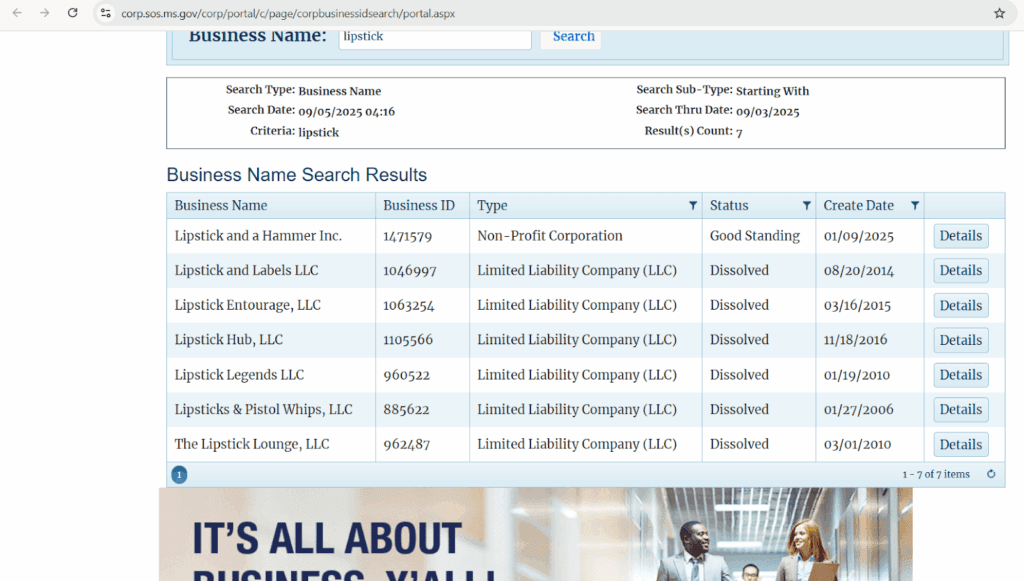
- Review the results table. Columns show Business Name, Business ID, Type, Status, and Create Date. Both active and inactive entities appear, so read the Status column.
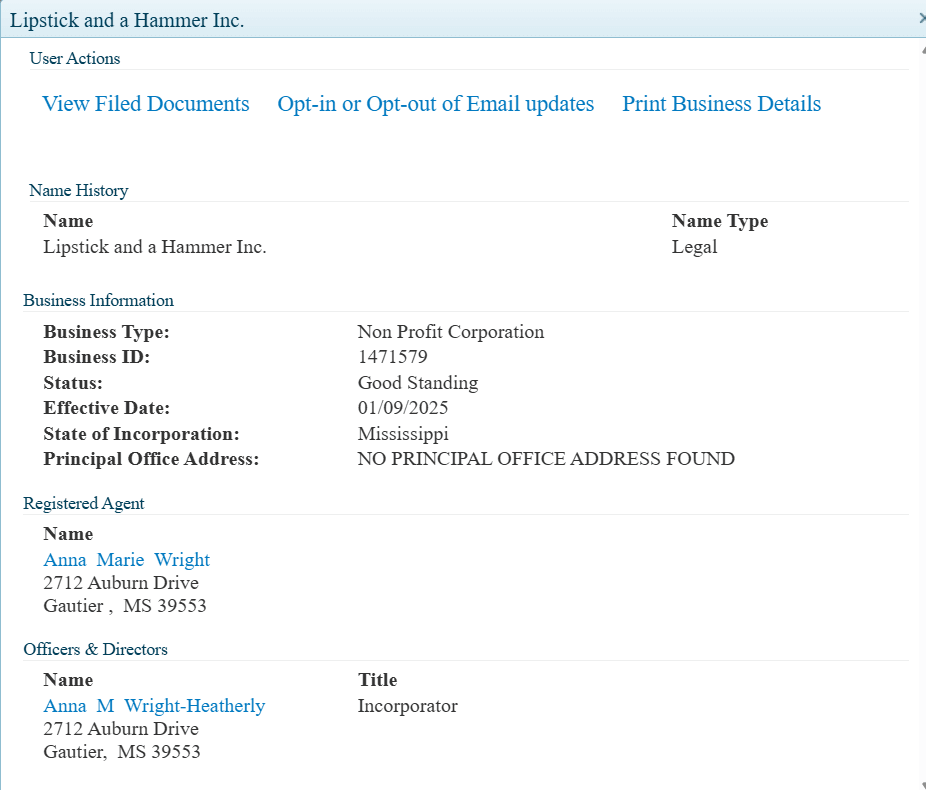
- Click Details for the full record. The record shows entity type, file number, registered agent, principal office address, officers or members (for LLCs, members are listed here), filing history, and current compliance status.
What Business Entity Types Appear in a Mississippi Search?
The search returns every entity type registered with the SOS: LLCs, for-profit and nonprofit corporations, LPs, LLPs, and qualified foreign entities. Each files a different formation document, and the search labels each record by type. The table below lists the main types with their formation filing.
| Entity type | Formation filing | Key fact | Source |
|---|---|---|---|
| LLC | Certificate of Formation ($50) | Governed by the Revised Mississippi LLC Act, Title 79, Chapter 29 | MS SOS fee schedule; Miss. Code § 79-29-101 |
| For-profit corporation | Articles of Incorporation ($50) | Subject to corporate income and franchise tax (see below) | MS SOS fee schedule; MS DOR |
| Nonprofit corporation | Nonprofit formation documents via the SOS “Form a Non-Profit Corporation” path | Charitable or educational purpose under the Mississippi Nonprofit Corporation Act | Miss. Code § 79-11 |
| Limited partnership (LP) | Certificate of Limited Partnership | General partners hold full liability; limited partners are capped at their investment | MS SOS |
| Limited liability partnership (LLP) | Statement of qualification | Liability protection with management participation | MS SOS |
| Foreign entity | Certificate of Authority (qualification) | “Qualified” status means an out-of-state business is authorized to operate | MS SOS |
For-profit corporations pay two Mississippi taxes, and the franchise tax is phasing out. The figures below come from the Mississippi Department of Revenue (DOR) corporate income and franchise tax page.
| 2026 corporate tax | Treatment | Source |
|---|---|---|
| Corporate income tax | Graduated: 0% on the first $5,000, 4% on the next $5,000, 5% over $10,000 | MS DOR |
| Franchise tax (2026) | $0.50 per $1,000 of capital over $100,000 | MS DOR |
| Franchise tax (2027) | $0.25 per $1,000 of capital over $100,000 | MS DOR |
| Franchise tax (2028+) | Fully repealed | MS DOR |
Some businesses never appear here. Sole proprietorships and general partnerships do not register with the SOS as entities. Doing-business-as (DBA) or fictitious names are handled separately and will not show in entity results.
What Do Mississippi Entity Status Designations Mean?
The Status column tells you whether an entity is compliant, and results include both active and inactive entities. Three statuses signal an operating business, and four signal a dissolved, forfeited, or withdrawn one. Read this column before relying on any record.
| Status | Meaning | Active or inactive |
|---|---|---|
| Good Standing | Current on all reports and fees | Active |
| Active | Registered; filings may be under review | Active |
| Qualified | Foreign entity authorized to operate in Mississippi | Active |
| Administratively Dissolved | SOS dissolved the entity for non-compliance | Inactive |
| Forfeited | Lost rights for continued non-compliance | Inactive |
| Revoked | Foreign entity’s authority revoked | Inactive |
| Withdrawn | Foreign entity ended its authorization | Inactive |
Status usually turns on the annual report. Mississippi LLCs and corporations file the annual report any time from January 1, and it is due by April 15 each year, per the MS SOS annual reports page. Missing the April 15 deadline is the typical trigger for administrative dissolution.
How Do You Reinstate an Administratively Dissolved Mississippi Entity?
An administratively dissolved Mississippi entity can apply to the SOS for reinstatement at any time after the dissolution date. There is no five-year deadline. Both Miss. Code § 79-4-14.22 (corporations) and § 79-29-825 (LLCs) allow application “at any time after the effective date of dissolution.”
The application must recite the entity’s name and dissolution date, state that the grounds for dissolution are eliminated, use a name that still satisfies state naming rules, and include a tax clearance certificate from the Mississippi DOR. A filing fee applies; confirm the current amount on the SOS fee schedule. Once granted, reinstatement relates back to the dissolution date as if the dissolution never occurred. Act promptly: a dissolved entity’s exclusive claim to its name lasts only a limited period before others can adopt it.
How Do You Check Business Name Availability in Mississippi?
Run the entity search with Exact Match first, then broaden to Any Words and Sounds Like to catch similar names. A Mississippi business name must be distinguishable from every registered name and carry the correct designator: LLC, L.L.C., or Limited Liability Company for LLCs; Inc., Corporation, Incorporated, or Company for corporations. A rejected name delays your filing.
Watch the inactive-entity trap. A dissolved entity in your results does not automatically block your name. Once the former entity’s exclusive claim to that name lapses, the name can become available for adoption, because the reinstatement statutes only preserve the old name if it still satisfies naming rules. Confirm any dissolved name’s status with the SOS before you rely on it. When your name clears, hold it with a name reservation: $25 reserves an available name for 180 days (MS SOS fee schedule).
How Do You Verify a Business Is Registered and Legitimate in Mississippi?
Search the name, open Details, and check three things: the status reads Good Standing, the registered agent has a real Mississippi address, and the filing history shows current annual reports. Together these confirm an entity is registered and compliant before you contract with it.
The Details view supports deeper due diligence. Search by Registered Agent to find every entity an agent represents. Review the listed officers or members. Read the filing history for amendments, dissolutions, or recent reinstatements. For a foreign company, a “Qualified” status confirms it is an authorized out-of-state business. For banking or high-value contracts, order an official Certificate of Good Standing from the SOS; check the current fee on the SOS fee schedule.
Why Does a Mississippi Entity Search Return No Results?
The usual causes are spelling variations, a legal name that differs from the trade name, or filing lag, because newly filed documents take about 24 to 48 hours to appear. Most no-result searches are fixable by broadening the query or searching a different field.
- Try alternate spellings and switch from Exact Match to Any Words.
- Search by Officer Name or Registered Agent instead of business name.
- Check the name history inside the Details view for former names.
- Retry later if the database is in a maintenance window.
- Call the SOS at 601-359-1350 for help interpreting results.
What Should You Do After Your Mississippi Entity Search?
Your next step depends on whether you are forming or maintaining a business. New businesses reserve the name, then file formation documents, then handle federal and state registration. Existing businesses keep filings current and order documents when banks or partners request them.
New businesses: reserve the name ($25, 180 days), file the Certificate of Formation or Articles of Incorporation ($50), get an Employer Identification Number (EIN) from the IRS, and register with the Mississippi DOR for sales tax or payroll.
Existing businesses: file the annual report between January 1 and April 15, update stale registered agent or officer details, and order a Certificate of Good Standing when needed.
| Fee item | Amount | Source |
|---|---|---|
| Name reservation (180 days) | $25 | MS SOS fee schedule |
| Certificate of Formation (LLC) | $50 | MS SOS fee schedule |
| Articles of Incorporation (corporation) | $50 | MS SOS fee schedule |
| Domestic LLC annual report | $0 | MS SOS annual reports |
| Corporation annual report | $25 | MS SOS Services & Fees |
How Commenda Simplifies Mississippi Entity Compliance
Commenda handles Mississippi entity formation, registered agent service, and ongoing compliance so your entities stay in Good Standing with the Secretary of State. Its entity management platform tracks every annual report deadline and files it, and its incorporation service files your Certificate of Formation or Articles of Incorporation the right way the first time.
Check a name with the company name checker before you form, and keep every due date visible with the compliance calendar. Book a demo to see every Mississippi filing deadline tracked in one place.