Expanding into New Hampshire starts with one question: does this company actually exist, and is it in good standing? Founders, investors, and advisors need reliable answers before they file, sign, or wire money. Guessing is how deals go sideways.
The New Hampshire business entity search answers that in seconds, for free. Run it through the official NH QuickStart Business Inquiry tool, reachable from sos.nh.gov under “Business Search.” One warning up front: privately owned lookalike sites such as secretaryofstate.com mimic this search and are not affiliated with the state, so stick to the official portals below.
What Is the New Hampshire Business Entity Search?
The New Hampshire business entity search is the free public lookup of every entity registered with the New Hampshire Secretary of State’s Corporation Division, run through the NH QuickStart portal. The Corporation Division records all required information on New Hampshire business entities, trademarks, and trade names and makes it public, per its statutory mission on sos.nh.gov. The sitting Secretary of State is David M. Scanlan, per the NH SOS administration page.
The only official portals are sos.nh.gov and quickstart.sos.nh.gov. Privately owned lookalikes copy the search layout and are not affiliated with the state.
Use the search to:
- Check whether a proposed business name is already taken.
- Confirm whether an entity is active, dissolved, or forfeited.
- Run due diligence on filing history, addresses, and agents.
- Map connections between entities through a shared registered agent or address.
| Detail | Value | Source |
|---|---|---|
| Official body | NH Secretary of State (SOS), Corporation Division | NH SOS, sos.nh.gov/corporations-0 |
| Secretary of State | David M. Scanlan, 54th Secretary of State (in office since January 2022) | NH SOS administration page |
| Search portal | NH QuickStart Business Inquiry, quickstart.sos.nh.gov | NH SOS / QuickStart |
| Search fields | Business Name, Business ID, Filing Number, Registered Agent | NH QuickStart Business Inquiry |
| Cost of search | Free | NH QuickStart Business Inquiry |
How Do You Run a New Hampshire Business Entity Search?
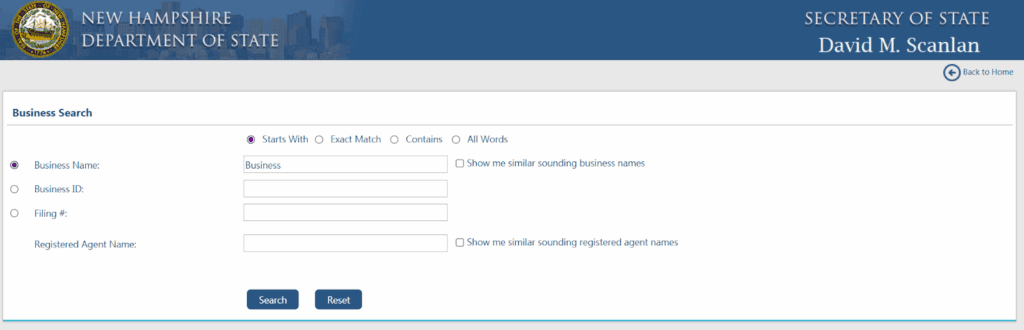
Go to the QuickStart Business Inquiry tool, pick a search field, choose a match type, clear the security check, and open the record. The NH QuickStart Business Inquiry tool searches by Business Name, Business ID, Filing Number, or Registered Agent, per QuickStart. The whole flow is free and takes under a minute for a clean name match.
Step 1: Open the QuickStart Business Inquiry tool
Start at sos.nh.gov, open “Business Search,” then “Business Record Search,” which loads the QuickStart Business Inquiry tool. Bookmark the quickstart.sos.nh.gov address so you never land on a lookalike site.
Step 2: Choose your search field and match type
Pick one field: Business Name, Business ID, Filing Number, or Registered Agent. Then pick a match type. QuickStart offers Starts With, Exact Match, Contains, and All Words, per the QuickStart Business Inquiry tool. Clear the CAPTCHA (anti-bot) security check before results load. Start broad with “Contains,” then tighten if you get too many hits.
Step 3: Read the results table
QuickStart returns eight columns: Business Name, Business ID, Home State, Previous Name, Business Type, Principal Office Address, Registered Agent Name, and Status, per the QuickStart Business Inquiry tool. The Home State column is the tell for foreign (out-of-state) entities: a home state other than New Hampshire means the company registered here from elsewhere.
Step 4: Open the entity record
Click a row to open the full record. Inside you see status, formation date, principal and mailing addresses, the registered agent, and the filing history with viewable documents. This is where officer and manager details surface through the underlying filings.
Step 5: Order official documents if needed
Order certified copies, past annual reports, or a Certificate of Good Standing through QuickStart when you need proof rather than a screenshot. Fees apply and depend on the document type.
How Do You Check If a Business Name Is Available in New Hampshire?
Search the proposed name with “Contains” and “All Words” to surface close variants; if nothing similar appears, the name is likely available. The search shows what already exists. It does not pre-approve a filing, because distinguishability is a filing-approval rule applied by the SOS, not a search-result rule.
Two records can legally coexist even when they look alike. “ABC Consulting LLC” and “ABC Consulting Inc.” are separate existing entities, yet the SOS would reject either as a brand-new registration, because an entity-type suffix alone does not make a name distinguishable.
If the name is clear but you are not ready to file, reserve it. An Application for Reservation of Name costs $15 and holds the name for 120 days, per the NH SOS Forms and Fees schedule and RSA 304-C:27. (RSA is New Hampshire’s Revised Statutes Annotated.)
Which Business Types Show Up in the Search?
Registered entities appear; unregistered sole proprietorships do not. A Limited Liability Company (LLC) forms under RSA 304-C, a corporation (C-Corp or S-Corp) forms under RSA 293-A, and a Limited Liability Partnership (LLP) is common for professional practices. Each carries liability, governance, and tax differences, but all of them file with the New Hampshire Secretary of State and therefore show in the search.
Do Sole Proprietorships and DBAs Appear in the Search?
Only if the owner registered a trade name; otherwise a sole proprietorship is absent from the search. A sole proprietor operating under a name other than their own legal name must register a trade name (a “doing business as,” or DBA) with the New Hampshire Secretary of State. Registered trade names are public and surface in the search as existing trade names attached to a record.
A DBA lookup matters when you vet an unincorporated vendor, when you check whether a brand is a registered trade name rather than a full entity, and when a missing result means an unregistered sole proprietor rather than no business at all.
What Do New Hampshire Entity Statuses Mean?
Status tells you whether an entity may legally operate in New Hampshire and whether the problem is fixable. A missed filing and a deliberate shutdown look different on the record and carry very different next steps. Read the Status column first, then decide whether to proceed, cure, or walk away.
| Status | What it means | Reinstatement possible? | Pathway / source |
|---|---|---|---|
| Active / Good Standing | Current on filings and fees; authorized to operate | N/A | NH SOS Corporation Division |
| Not in Good Standing | Missed a required filing or fee; benefits restricted | Yes | File the outstanding report/fee; NH SOS |
| Administratively Dissolved | SOS dissolved it for delinquency (e.g., unfiled annual reports) | Usually yes | File back reports + fees + reinstatement; RSA 293-A:14.20 |
| Forfeited | Authority withdrawn for unfiled reports/fees; not always closed | Often yes | Cure delinquency, then reinstate; NH SOS |
| Voluntarily Dissolved | Owners wound the entity down themselves | Generally no | Not cured by reinstatement; NH SOS |
| Expired | Registration or charter lapsed at deadline | Varies | Renew via QuickStart; NH SOS |
| Withdrawn | Foreign entity formally exited New Hampshire | N/A | Re-register if returning; NH SOS |
Administrative dissolution follows missed annual reports or fees and is typically reversible. Voluntary dissolution is the owners’ own wind-down and is not undone by a reinstatement filing. A “Forfeited” label does not always mean the business has closed for good.
How Do You Reinstate a Dissolved or Forfeited New Hampshire Business?
An administratively dissolved or forfeited entity reinstates by filing every outstanding annual report, paying the accumulated fees, and submitting the reinstatement filing with the New Hampshire Secretary of State; a voluntarily dissolved entity generally cannot reinstate the same way. Which path applies depends entirely on why the entity lost its status.
Administrative dissolution or forfeiture. Cure the delinquency through QuickStart or a paper filing. Because New Hampshire does not dissolve a corporation until its annual report has gone unfiled for 12 months after the due date, per RSA 293-A:14.20, there is usually a window to catch up before dissolution even hits. Confirm the current reinstatement form, fee, and any time limit on sos.nh.gov before you file.
Voluntary dissolution. Contact the Corporation Division to confirm your options, since forming a new entity is often the only route. Call the SOS when the status is voluntary or when a time limit may have passed; refile the back reports yourself when the status is administrative and clearly reversible.
How Do You Verify a Company Is in Good Standing in New Hampshire?
Two ways, one free and one official. The free check is the entity search Status field, which shows Active or Good Standing. The official proof is a Certificate of Good Standing, a featured SOS service ordered through QuickStart (verify the current fee and turnaround on sos.nh.gov). The certificate confirms the entity exists and is current on its filings and fees.
You need the certificate for bank accounts, financing, mergers and acquisitions (M&A), major contracts, and foreign qualification in other states. A screenshot of the Status field is fine for informal vetting; counterparties and banks want the certificate.
Certificate of Formation vs. Articles of Incorporation: What’s the Difference?
A Certificate of Formation creates a New Hampshire LLC, while Articles of Incorporation create a New Hampshire corporation. The formation of a domestic NH LLC is governed by RSA 304-C:31, which takes effect when the certificate is filed, per New Hampshire statute; corporations form under RSA 293-A. “Certificate of incorporation” is an informal synonym some states use, but New Hampshire labels the corporate document Articles of Incorporation.
Both documents appear in an entity’s filing history inside the search record. That makes the search a quick way to pull a company’s founding document without a separate request.
What Does a Registered Agent Do in New Hampshire?
Every New Hampshire entity must maintain a registered agent with a physical New Hampshire street address (no P.O. box) to accept service of process and official mail. The agent’s name and address are public and searchable, per the QuickStart Business Inquiry tool. QuickStart even lets you search by registered agent directly.
That search-by-agent option powers due diligence. When several entities share one agent or one address, you can map related companies and spot shell structures that a name search alone would miss.
How Do You Register a Foreign Entity in New Hampshire?
A company formed in another state registers with the New Hampshire Secretary of State before operating in New Hampshire, filing an Application for Registration (foreign LLC) or an Application for Certificate of Authority (foreign corporation), usually with a recent Certificate of Good Standing from its home state. Foreign qualification is simply the process of getting an out-of-state company authorized to do business here.
The mini workflow:
- Run the NH name search first, since your home-state name may conflict with an existing NH record.
- Gather a recent Certificate of Good Standing from your home state. The contents of a foreign corporation’s application are set by RSA 293-A:15.03, amended effective November 1, 2023, per New Hampshire statute.
- File via QuickStart and appoint an NH registered agent.
Expanding across New England? Compare the same lookup in neighboring states with Commenda’s guides to the Vermont business entity search, the Massachusetts business entity search, the New York business entity search, and the New Jersey business entity search. For the home-state filing itself, see Commenda’s guide on how to register a business in New Hampshire.
How Do You Check a Foreign Entity’s Registration Status in NH?
Search the company name in QuickStart, read the Home State column to confirm it is a foreign entity, and check that Status shows Active. A home state other than New Hampshire confirms the company registered here from elsewhere. A Withdrawn status means it formally exited New Hampshire and is no longer authorized to operate.
How Do You Update Your Business Address or Registered Agent?
File the change through the SOS’s Update Business Records service on QuickStart, which covers principal office address changes, registered agent changes, and other amendments. Keeping these current is a compliance obligation, not housekeeping, because stale addresses are where missed notices begin.
The annual report is where stale details surface. New Hampshire LLCs and corporations must deliver the report between January 1 and April 1 each year, with a $100 fee and a $50 late fee, per the NH SOS Forms and Fees schedule and the NH annual report filing page. Miss enough reports and the entity slides into administrative dissolution, which sends you back to the reinstatement path above.
What Are New Hampshire’s Business Filing Fees?
Most New Hampshire filings cost around $100 or less, and QuickStart adds a flat $2.00 electronic handling charge, in effect since July 1, 2004 under RSA 5:10-a, per the NH SOS Forms and Fees schedule. Every figure below is verified against sos.nh.gov before publishing.
| Filing | Fee | Source |
|---|---|---|
| LLC Certificate of Formation | $100 paper / $102 online (incl. $2 e-filing charge) | NH SOS Forms & Fees (LLCs) |
| Articles of Incorporation (Form 11, domestic for-profit) | $100 (+$2 online) | NH SOS Form 11 / Forms & Fees |
| Foreign LLC Application for Registration (Form FLLC-1) | $100 (+$2 online) | NH SOS Form FLLC-1 |
| Foreign corporation Certificate of Authority (Form 40) | $100 (+$2 online) | NH SOS Form 40 / Forms & Fees |
| Annual report (LLC and corporation) | $100; $50 late fee | NH SOS Forms & Fees |
| Application for Reservation of Name (Form 1) | $15 / 120 days ($30 for NH investment trust) | NH SOS Form 1 / RSA 304-C:27 |
| Foreign corp Amendment (Form 42) / Withdrawal (Form 44) | $35 each | NH SOS Forms & Fees (Corporations) |
| Certificate of Good Standing | Fee applies; order via QuickStart | NH SOS (verify current fee) |
What Should You Do After Your Search?
Your next steps depend on whether you are forming a business or investigating one. Forming means locking in a name and filing; investigating means preserving what you found and acting on the entity’s status. Pick the branch that matches your goal.
For New Businesses
Reserve the name if you are not ready to file, then file the Certificate of Formation or Articles of Incorporation via QuickStart. Appoint a New Hampshire registered agent, get an Employer Identification Number (EIN) from the IRS, register with New Hampshire Employment Security if you plan to hire, and check any industry permits.
For Existing-Business Research
Save or print your results for the file. Order certified copies or a Certificate of Good Standing when a counterparty needs proof. If you find a dissolved or forfeited status, use the reinstatement section above to decide whether to cure the delinquency or walk away from the deal.
How Commenda Simplifies New Hampshire Entity Management
A single-state search is easy; managing entities across every state you touch is where the spreadsheets break down. Commenda’s entity management platform standardizes formation workflows, automates annual report deadlines, and tracks registered agents and record changes in one dashboard, so New Hampshire is handled the same way as every other jurisdiction. No more missed April 1 deadlines and no more notices mailed to a decade-old address.
Forming rather than researching? Commenda’s incorporation support handles the filing, registered agent, and foreign qualification end to end.
Book a demo to see every entity’s status and filing deadline for New Hampshire and beyond in one dashboard.