The New Mexico business entity search is the free, official lookup tool run by the New Mexico Secretary of State on its Enterprise portal, at enterprise.sos.nm.gov/search/business. Founders check whether a name is free, companies vet a partner or vendor, and firms expanding into New Mexico confirm an entity is real and active.
This guide shows you how to search, read the results, check good standing, look up a business ID, and act on what you find.
What Is the New Mexico Business Entity Search?
The New Mexico business entity search is the official, free public database of every entity registered with the New Mexico Secretary of State (SOS). The SOS Business Services Division maintains it on the state’s Enterprise portal. Searching and viewing records costs nothing. Only certified documents carry a fee.
The SOS calls its filing and search system the “Enterprise” portal. All business filings and searches now run through it, and the office no longer accepts paper filings, per the New Mexico SOS Business Services page. Common uses:
- Name availability: confirm a proposed name is not already taken.
- Entity verification: check a business’s status, type, and formation details.
- Due diligence: review registered agents, officers, and filing history before you sign.
How Do I Perform a New Mexico Business Entity Search?
Go to the search page, enter a name, business ID, registered agent, or officer name, then click the magnifying glass or open “Advanced.” The Enterprise portal returns every matching registered entity for free, and each result links to a full record with filings and agent details.
Step 1: Open the Enterprise portal search page
Go directly to enterprise.sos.nm.gov/search/business. The page title identifies it as an official New Mexico government website.
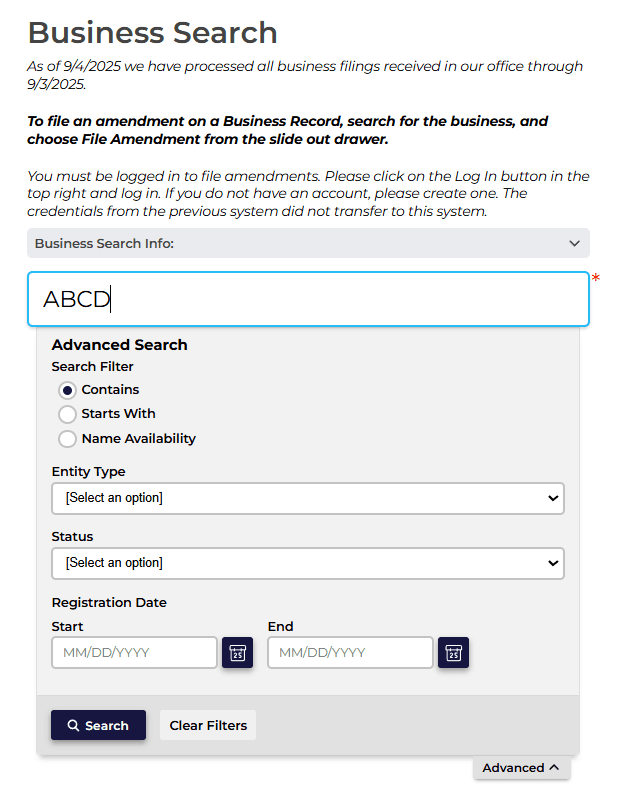
Step 2: Enter your search criteria
Type an entity name, business ID number, registered agent, or officer name into the search box. Open “Advanced” to refine with Contains, Starts With, or Name Availability radio buttons, Entity Type and Status dropdowns, and a registration date or date range.
Step 3: Review the results list
The results list shows scannable fields for each match: entity name, business ID, entity type, entity subtype, formation date, and legal status. Use these to short-list the right record quickly.
Step 4: Open the entity record
Click a result to open a slide-out record with filings, registered agent, officers, and filing history. The database updates regularly, but recent filings and status changes can lag by a few days, so a just-filed change may not appear yet.
Step 5: Order official documents (optional)
From the record you can order certified copies, certificates, and apostille or authentication requests. Fees and online payment apply, as covered in the good-standing section below.
How Do I Check if a Business Name Is Taken in New Mexico?
Run an Advanced search with the “Name Availability” radio button. A new name must be distinguishable from every registered or reserved entity, not merely non-identical, under New Mexico Statutes Annotated (NMSA) 1978 § 53-19-3. Passing this check is not trademark clearance.
The three radio buttons work differently. “Contains” finds any name that includes your term anywhere. “Starts With” finds only names that begin with it. “Name Availability” tests distinguishability for a new filing. Searching “Rio Grande” with Contains returns “Southern Rio Grande Trading Co.”; with Starts With it returns only names beginning “Rio Grande.”
New Mexico naming rules add constraints. An LLC (limited liability company) name must contain “limited liability company,” “limited company,” or an abbreviation, per the SOS name reservation form. Restricted terms like “Bank,” “Insurer,” or “Government” need special approval. Punctuation, filler words, and plurals do not create distinction. For brand protection, run a separate federal search at the USPTO (United States Patent and Trademark Office).
How do I reserve a business name in New Mexico?
File an Application for Name Reservation with the Secretary of State. The fee is $20 and the reservation holds the name for 120 days from the filing date, per NMSA 1978 § 53-19-4 and the SOS name reservation form. The same $20 fee and 120-day term apply to foreign LLC name reservations.
What Is a New Mexico Business ID Number and How Do I Look One Up?
The business ID, also called the control number, is the unique identifier the Secretary of State assigns each entity at registration. Enter it in the search box for an exact-match lookup. In New Mexico’s system, “business ID” and “control number” refer to the same identifier. It is not an EIN or a state tax ID.
An owner finds their business ID on their SOS record or their original formation confirmation. Because it is unique to one entity, searching by business ID avoids the name-collision problem you get when several companies share similar names.
How Do I Verify a Business’s Status and Good Standing in New Mexico?
Open the entity record and read the legal status field. “Active” means the entity is authorized to do business. A Certificate of Good Standing is the formal proof, ordered from the same portal for a fee. The portal does not display “Good Standing” as a status label; it is a condition evidenced by the certificate, not a value in the status field.
| Status | What it means | Can it be fixed? | Source |
|---|---|---|---|
| Active | Authorized to do business in New Mexico | Maintain filings to keep it | NM SOS Enterprise portal |
| Inactive | Not currently active in filings | Often eligible for reinstatement | NM SOS Enterprise portal |
| Dissolved | Formally closed, voluntarily or administratively | Sometimes, via reinstatement | NM SOS Enterprise portal |
| Forfeited | Lost rights for noncompliance (unpaid fees, missed reports) | Yes, by curing the deficiency | NM SOS Enterprise portal |
| Revoked | Authority withdrawn for compliance failure | Sometimes | NM SOS Enterprise portal |
| Suspended | Reporting requirements unmet, operating status halted | Yes, by curing filings | NM SOS Enterprise portal |
| Expired | Registration passed its valid period without renewal | Yes, by renewing or refiling | NM SOS Enterprise portal |
Statuses like Forfeited or Suspended signal a compliance failure, not that the entity never existed, and reinstatement is often possible.
What official documents can you order?
Three distinct document types are available through the Enterprise portal for international, legal, and lender needs.
| Document | Purpose | Fee | Source |
|---|---|---|---|
| Certificate of Good Standing / Status | Proof of compliance for banks, lenders, foreign qualification | LLC $25, nonprofit $10, for-profit corporation $50 | NM SOS Request for Good Standing and Status Certificates form |
| Certified copy of filings | Court or legal proof of filed documents | $25 | NMSA 1978 § 53-2-1; NM SOS filing-help guide |
| Plain (uncertified) copy | Informational copy of a filing | LLC $10, nonprofit $5 | NM SOS filing-help guide |
| Apostille / authentication | Authenticates documents for international use | Fee applies | NM SOS Enterprise portal |
A completed certificate or copy request stays downloadable in your work queue for only 90 days before a new request and fee are required, per the SOS filing-help guide. Note a separate document, the Letter of Good Standing from the New Mexico Taxation and Revenue Department, confirms state tax compliance rather than entity status.
Which Business Entities Appear in New Mexico Search Results?
The search returns every entity registered with the Secretary of State, including out-of-state (“foreign”) companies registered to operate in New Mexico. Sole proprietorships generally do not appear, because they file no formal registration with the SOS.
| Entity type | Liability | Appears in search? | Source |
|---|---|---|---|
| Limited liability company (LLC) | Limited | Yes | NM SOS Business Services |
| For-profit corporation (may elect C-Corp or S-Corp federal tax status) | Limited | Yes | NM SOS Business Services |
| Nonprofit corporation | Limited | Yes | NM SOS Business Services |
| General partnership (GP) | Unlimited, shared | Yes, if registered | NM SOS Business Services |
| Limited partnership (LP) | General partners unlimited; limited partners limited | Yes | NM SOS Business Services |
| Registered limited liability partnership (RLLP) | Limited for partners | Yes | NM SOS Business Services |
| Limited liability limited partnership (LLLP) | Limited | Yes | NM SOS Business Services |
| Sole proprietorship | Full personal liability on the owner | No | NM SOS Business Services |
Foreign entities defined. “Foreign” means formed outside New Mexico, in another state or country, and registered with the New Mexico SOS to do business in the state. These appear in results, which matters when you vet or compete with companies expanding into New Mexico.
DBAs explained. A DBA (doing business as, also called a trade name) is an alternate operating name, not a legal entity. Search by the legal entity name, not the DBA, or the search may return nothing.
What Should You Do After Your New Mexico Entity Search?
If you are forming a business and the name is clear, reserve it or file. If you are researching an existing entity, order documents or resolve any status problems. Both paths start from the same free search.
For new businesses
| Step | Where | Fee | Source |
|---|---|---|---|
| Reserve the business name | NM SOS Enterprise portal | $20, valid 120 days | NMSA 1978 § 53-19-4; NM SOS name reservation form |
| File Articles of Organization or Incorporation | NM SOS Enterprise portal | Set by the current SOS fee schedule | NM SOS Business Services fee schedule |
| Register for a Business Tax Identification Number | NM Taxation and Revenue Department | Registration required | NM Taxation and Revenue Department |
| Apply for an Employer Identification Number (EIN) | IRS | Free | IRS (Internal Revenue Service) |
| Obtain state and local licenses | State and local agencies | Varies | NM state and local agencies |
For existing-business research
Order a certified copy or a Certificate of Good Standing for lenders, banks, or foreign qualification. If the entity shows Forfeited, Suspended, or Dissolved, resolve the outstanding filings and fees to restore standing. Walk-in service at the SOS office runs Monday through Thursday and is closed Fridays, so the online portal is usually faster.
How Commenda Simplifies New Mexico Entity Management
One search tells you whether a name is free or a partner is legitimate. Keeping an entity in good standing is the ongoing work, and that is where most teams lose track. Commenda’s entity management platform runs standardized formation workflows, monitors compliance deadlines, and sends alerts for status changes and upcoming fees, so a Forfeited or Suspended surprise never reaches your records.
If you are still forming, Commenda’s incorporation support handles the New Mexico filing from name reservation through Articles of Organization, and its compliance calendar tracks every deadline per entity. Book a demo to get every New Mexico filing tracked and handled from day one.