You need to verify a name or vet a company before you file anything in Pennsylvania. The Pennsylvania business entity search is the free public tool that does it. It runs through the state’s PENN File system at file.dos.pa.gov/search/business, maintained by the Pennsylvania Department of State (DOS). This guide is current for 2026 and covers the new annual report requirement that took effect in 2025.
The search is fast and public. Anyone can look up a registered entity, confirm its status, and open its filing history. Below is the quick reference, then the full walkthrough.
| Fact | Detail | Source |
|---|---|---|
| Official search tool | file.dos.pa.gov/search/business | PA DOS record searches |
| Cost to search | Free | PA DOS |
| Operated by | Bureau of Corporations and Charitable Organizations, PA DOS | PA DOS |
| LLC filing fee | $125 | PA DOS fee schedule |
| Annual report fee | $7 for-profit, $0 nonprofit | PA DOS annual reports |
| Annual report start | 2025, under Act 122 of 2022 | PA DOS annual reports |
What Is a Pennsylvania Business Entity Search?
A Pennsylvania business entity search is a free public database from the Pennsylvania Department of State that covers every registered entity in the Commonwealth. It now runs through the PENN File system at file.dos.pa.gov/search/business, operated by the Bureau of Corporations and Charitable Organizations. It is the authoritative source for entity records in Pennsylvania.
People run this search for four main reasons:
- Name availability: confirm your desired name is not already registered before you file.
- Status checks: see whether a company is active, dissolved, or out of compliance.
- Due diligence: vet partners, vendors, competitors, or acquisition targets.
- Compliance: check your own record and confirm your filings are current.
How Do I Search the PA Department of State Business Database?
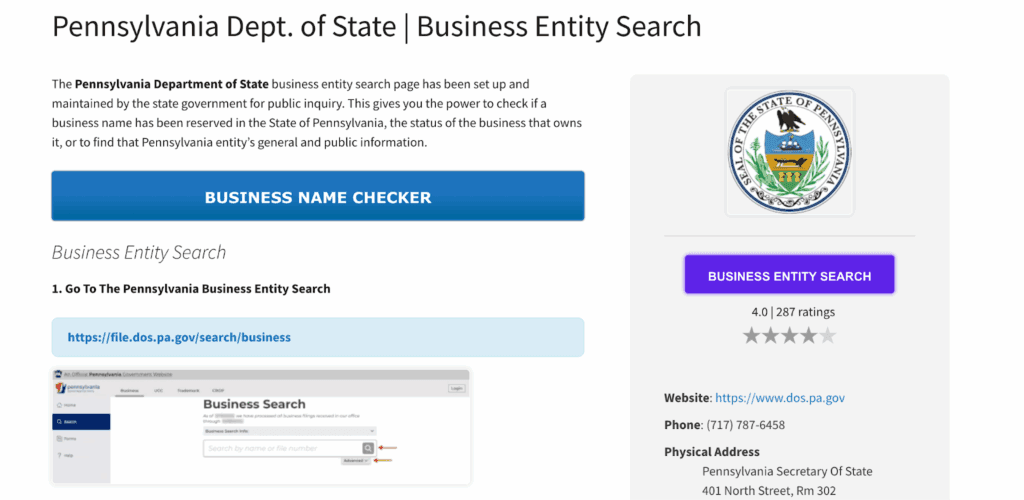
Go to file.dos.pa.gov/search/business, type a business name, and click Search. For tighter results, open Advanced search to filter by how the name matches, filing type, status, and filing date. The tool is free, and no account is required to view public records. Clicking any result name opens the full entity record.
Here is the walkthrough that matches the live portal:
- Open the portal. Visit file.dos.pa.gov/search/business, the PA Department of State business search run through PENN File.
- Run a simple search. Enter a full or partial business name and click Search.
- Open Advanced search for filters. Choose a search filter of Contains or Starts With, then narrow by Filing Type, Status, and a Filing Date range.
- Open a record. Click an entity name to view its filing history and available documents.
Can You Search Pennsylvania Businesses by Entity Number?
The public tool indexes records by entity name or entity number only, so there is no separate number-only search field on the main form. The PA Department of State’s record searches page confirms records “may only be accessed by the correct entity name or entity number,” not by officer, owner, entity type, tax ID, purpose, or address. The entity number appears on the detail page once you open a record.
For most users, a name search is the fastest path. You typically discover the entity number after locating the record, then keep it for later filings and reference. The PA DOS record searches page states records are not indexed by type, tax or Federal I.D. Number, purpose, or business address.
What Do Pennsylvania Entity Search Results Show?
Each result row shows the entity name, filing information, initial filing date, status, entity type, the jurisdiction it was formed in, and its address. Clicking the entity name opens the detail record with full filing history, the entity number, the registered office or provider address, and any available documents. The result fields come directly from the live PENN File tool.
| Result field | What it tells you | Source |
|---|---|---|
| Entity name | Registered legal name | PA DOS record searches |
| Filing information | Filing type and reference data | PA DOS live tool |
| Initial filing date | When the entity first registered | PA DOS live tool |
| Status | Active/subsistence, dissolved, and similar designations | PA DOS live tool |
| Entity type | LLC, corporation, LP, and so on | PA DOS live tool |
| Formed in | Home jurisdiction (PA or foreign) | PA DOS live tool |
| Address | Registered office or provider address | PA DOS live tool |
An active or subsistence status means the entity is current with the Commonwealth. A dissolved status means its legal existence has ended.
How Do You Check If a Business Name Is Taken in Pennsylvania?
Search your exact name and its close variants; Pennsylvania requires a name distinguishable from every existing registration, plus a proper entity designator. If no matching active record appears, the name is likely available. Test abbreviations, alternate spellings, and spacing, and drop designators like “LLC” or “Inc.” to catch near matches. Availability at search time is not a guarantee of acceptance at filing.
To lock a cleared name, file a name reservation. A Pennsylvania name reservation (Form DSCB:15-208) costs $70 and holds the name exclusively for 120 days, under 19 Pa. Code § 17.31. A six-month hold applies only to certain Banking Code and Savings Association Code reservations, per the same regulation.
What Types of Business Entities Are Registered in Pennsylvania?
Pennsylvania’s database covers the formal entity types registered with the Department of State. Sole proprietorships do not appear, because they are not registered entities. The common types are:
- Corporation: strong liability protection for shareholders and stock-based investment; fits companies planning growth or outside funding.
- Limited Liability Company (LLC): liability protection with flexible management and pass-through tax treatment; popular with small and mid-sized firms.
- Limited Partnership (LP): general partners manage with unlimited liability, limited partners invest with protection; common in real estate and investment vehicles.
- Limited Liability Partnership (LLP): partnership taxation with liability protection; used by attorneys, accountants, and other licensed professionals.
- Nonprofit Corporation: organized for charitable, educational, or public-benefit purposes with specific operating rules.
- Professional Corporation (PC): a corporate form for licensed professionals such as doctors, lawyers, and engineers.
How Do You Register an LLC in Pennsylvania?
File a Certificate of Organization (Form DSCB:15-8821) together with a Docketing Statement (Form DSCB:15-134A) with the Bureau of Corporations and Charitable Organizations for $125. In Pennsylvania an LLC files a Certificate of Organization, not Articles of Organization. A corporation files Articles of Incorporation, and the Certificate of Incorporation is the resulting proof of formation. Both filings run through PENN File.
| Filing | Form | Fee | Source |
|---|---|---|---|
| LLC Certificate of Organization | DSCB:15-8821 | $125 | PA DOS fee schedule |
| Articles of Incorporation (for-profit) | — | $125 | PA DOS fee schedule |
| Docketing Statement (accompanies formation) | DSCB:15-134A | Included | PA DOS LLC guide |
| Name reservation | DSCB:15-208 | $70 | PA DOS fee schedule |
The $125 Certificate of Organization fee is nonrefundable whether the filing is accepted or rejected, per the PA DOS fee schedule.
What Are Pennsylvania’s Registered Agent Requirements?
Pennsylvania uses the term “registered office,” not “registered agent.” Every entity must maintain a physical Pennsylvania street address, not a P.O. box, or list a Commercial Registered Office Provider (CROP) in its place. When you use a CROP, you list the provider’s name instead of a street address. This differs from New York, New Jersey, and Delaware, which all use “registered agent” language.
The registered office keeps official notices flowing to a reliable address. Tax notices and legal service go there, so an outdated address is a real compliance risk.
What Is Pennsylvania’s New Annual Report Requirement?
Under Act 122 of 2022, Pennsylvania replaced its old decennial report with an annual report for all domestic and foreign filing associations, effective January 1, 2025. The fee is $7 for most for-profit entities and $0 for nonprofits, per the PA DOS annual reports page. Deadlines vary by entity type. This is the biggest recent change to Pennsylvania entity compliance.
| Entity type | Deadline | Fee | Source |
|---|---|---|---|
| Business corporations | June 30 | $7 | PA DOS annual reports |
| Nonprofit corporations | June 30 | $0 | PA DOS annual reports |
| LLCs | September 30 | $7 | PA DOS annual reports |
| LPs, LLPs, business trusts, professional associations | December 31 | $7 | PA DOS annual reports |
The Department of State will not administratively dissolve, terminate, or cancel any association for a missed annual report during the 2025 to 2026 grace period, per the PA DOS annual reports page. Enforcement begins with reports due in 2027, when a missed filing triggers administrative dissolution six months after the due date and loss of protection of the entity’s name.
How Do You Get a Certificate of Good Standing in Pennsylvania?
Pennsylvania does not issue a document called a Certificate of Good Standing. The equivalent for domestic entities is the Certificate of Subsistence, requested through PENN File from the Department of State. The entity must be current on all filings, including the new annual report, to qualify. Confirm the current fee on the PA DOS fee schedule before ordering.
Banks, lenders, and other states commonly require this certificate. You typically need it to open accounts, secure loans, or foreign qualify in another state.
Do Out-of-State Businesses Need to Register in Pennsylvania?
Yes. A foreign entity doing business in Pennsylvania must file a Foreign Registration Statement (Form DSCB:15-412) with the Department of State and is subject to the annual report requirement. Confirm the current filing fee on the PA DOS fee schedule. Many companies form in Delaware, then foreign qualify in Pennsylvania.
If you are comparing states, run the neighboring searches too. The Delaware business entity search guide helps confirm your home-state record before you register in Pennsylvania.
How Commenda Helps With Pennsylvania Entity Compliance
Pennsylvania’s new annual report deadlines, registered office rules, and Subsistence Certificate requirements are easy to miss, and missing them puts your entity at risk after 2027. Commenda’s entity management platform tracks each Pennsylvania deadline, maintains your registered office or CROP details, and confirms every filing gets done on time. When you are forming a new entity, Commenda’s incorporation service files your Certificate of Organization and Docketing Statement for you.
Check a name before you file with the Commenda company name checker, and keep every June 30, September 30, and December 31 deadline in view with the Commenda compliance calendar. If you are also selling into the Commonwealth, the Pennsylvania sales tax compliance guide covers your tax obligations.
Book a demo to get a free compliance-deadline review of your Pennsylvania entities.