Paying a supplier against an invalid Thai Value Added Tax (VAT) identification number puts your money at risk. You can lose the input VAT credit, face penalties, and draw audit attention. A quick check protects the credit and documents your due diligence.
You can verify any Thai VAT ID for free. Enter the 13-digit number on the Thailand Revenue Department (RD) VAT registrant search portal and confirm the entity name, status, and address match the invoice. Here are the facts you need before you pay:
| Fact | Detail | Source |
|---|---|---|
| Format | 13 numeric digits, no letters | Revenue Department |
| Standard VAT rate | 7% (extended 1 Oct 2025 – 30 Sep 2026) | Royal Decree No. 799; Bloomberg Tax |
| Registration threshold | ฿1.8 million annual turnover | Revenue Code Section 81/1 |
| Registration deadline | Within 30 days of crossing the threshold | Revenue Code Section 85/1 |
| Where to verify | RD VAT search portal, free and real-time | Revenue Department |
What Is a Thailand Tax Registration Number (VAT ID)?
Thailand uses one 13-digit Tax Identification Number (TIN) as the universal tax identifier. There is no separate VAT-only number. For companies, the TIN equals the Department of Business Development (DBD) registration number issued since 2012. For individuals, it is the national ID number. VAT registration (form P.P.01) with the Revenue Department is a separate step; once registered, the TIN doubles as the VAT ID.
So when someone says “Thailand VAT number,” they mean the 13-digit TIN of a VAT-registered entity. Verifying it means confirming the number exists and the entity is currently VAT-registered and active.
What Is the Thailand VAT Number Format?
A Thailand VAT number is 13 digits, numeric only, with no letters. Documents often group it as X-XXXX-XXXXX-XX-X, but you enter it as a continuous string to verify. Thailand does not officially add a “TH” prefix; some international systems tag it that way, and you must strip “TH” before verification.
| Digit position | What it encodes | Source |
|---|---|---|
| Digit 1 | Entity or registration type | Revenue Department / DBD numbering |
| Digits 2–12 | Registration and sequence data | Revenue Department / DBD numbering |
| Digit 13 | Check digit (modulus-11 checksum) | Revenue Department / DBD numbering |
Common input errors that break a lookup:
- Entering fewer or more than 13 digits.
- Leaving in dashes, spaces, or grouping dots.
- Transposing digits.
- Typing “TH” into the portal field.
How does the check digit (modulus-11 checksum) work?
The 13th digit is a modulus-11 check digit that validates the first 12. Multiply digits 1 through 12 by descending weights (13 down to 2), sum the products, then compute (11 − (sum mod 11)) mod 10. The result should equal the 13th digit. If it does not, the number is invalid.
This lets a validation tool screen out typos and fake numbers before it ever hits the portal.
Who Must Register for VAT in Thailand?
VAT registration is mandatory once annual turnover exceeds ฿1.8 million, and the business must register within 30 days of crossing that threshold under Revenue Code Section 85/1. Businesses below the threshold may register voluntarily. The standard VAT rate is 7% and exports are zero-rated, per the Revenue Department.
Thailand introduced VAT in 1992 at a statutory 10% rate and cut it to 7% in 1997 during the Asian financial crisis. Royal Decrees have renewed the 7% rate ever since; Royal Decree No. 799 holds it at 7% from 1 October 2025 through 30 September 2026, per Bloomberg Tax. The ฿1.8 million threshold was set by Royal Decree No. 432 (B.E. 2548), effective 1 April 2005.
How Do You Verify a Thailand VAT Number Online? (Step-by-Step)
Use the Revenue Department VAT search portal at eservice.rd.go.th. It is free and real-time. Enter the 13 digits with no spaces or prefix, pass the CAPTCHA, and confirm the returned entity name, VAT status, branch, and address match the supplier’s invoice.
- Open the Revenue Department VAT registrant search.
- Choose the domestic VAT registrant search and enter the 13-digit TIN with no spaces or “TH” prefix.
- Complete the CAPTCHA security step.
- Click search.
- Review the returned name, VAT status, branch, and registered address, and match them to the supplier’s invoice.
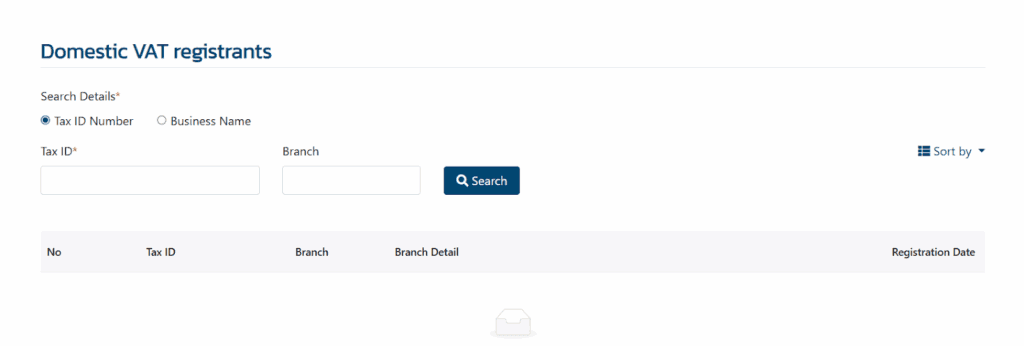
The interface is primarily in Thai. Use your browser’s translate feature (in Chrome, right-click and choose Translate to English). The Tax ID field is the top input, the Branch field sits beside it, and the search button follows the CAPTCHA.
Can You Cross-Check a Thai Company on the DBD Registry?
Yes. The DBD DataWarehouse lets you look up a company by its 13-digit registration number to confirm legal existence, status, registered capital, and directors. The DBD confirms the company is real and active; the Revenue Department portal confirms VAT-registration status. Full due diligence checks both sources.
Use the DBD lookup when a supplier is new to you or when the RD name and the invoice name do not match cleanly.
Do Foreign Businesses Need a Thai VAT Number?
Yes, when they trade in Thailand. Foreign companies operating in Thailand register for VAT under the same 13-digit TIN system as domestic businesses. Their numbers appear on the same Revenue Department portal and are verified the same way. See our guide to VAT registration in Thailand for foreign companies for the registration path.
Cross-border teams usually run this check in both directions: they verify Thai counterparties before payment, and they confirm their own registration shows correctly in RD records.
Why Verify a Supplier’s VAT ID Before Payment?
An invalid or deregistered supplier VAT ID can cost you the input VAT credit, trigger filing errors, and raise audit risk. Thai VAT works on an input-output mechanism: you need a valid tax invoice from a VAT-registered supplier to reclaim input VAT. Verifying before payment protects the credit and documents your due diligence.
If the registration is invalid, the Revenue Department can disallow the claim on audit, so you effectively eat the 7% you expected to reclaim. A saved verification record also supports the credit when you get to filing your VAT returns in Thailand.
What Are the Penalties for an Invalid VAT ID in Thailand?
Penalties range from small administrative fines to surcharges and criminal exposure for fraud. The table below maps each violation to its penalty and the governing Thai Revenue Code section. All figures come from the Revenue Department’s Revenue Code pages.
| Violation | Penalty | Revenue Code source |
|---|---|---|
| Minor/procedural violations (e.g. failing to notify registration changes) | Fine up to ฿2,000, no imprisonment | Section 90 |
| Operating a VAT business without registering (civil) | 2x tax due, minimum ฿1,000 per month | Section 89(1) |
| Late or unpaid VAT | Surcharge of 1.5% per month, capped at the tax due | Section 89/1 |
| Operating without registration (criminal) | Up to 1 month imprisonment and/or up to ฿5,000 fine | Section 90/2 |
| Unauthorized invoicing by foreign agents, improper cash-register use | Up to 6 months imprisonment and/or up to ฿10,000 fine | Section 90/3 |
| Fraudulent VAT reporting or false tax invoices | Imprisonment 3 months–7 years and fine ฿2,000–฿200,000 | Section 90/4 |
| Director or manager who allowed the offence | Same penalty as the underlying offence | Section 90/5 |
How Should Finance Teams Add VAT Checks to Vendor Onboarding?
Verify before the first payment, not after. Build the check into vendor onboarding so no supplier gets paid on an unverified number. The checklist below turns verification into a repeatable step your accounts payable (AP) team runs every time.
- Collect the 13-digit TIN from the vendor.
- Run a format and modulus-11 checksum check.
- Verify the number on the RD portal and confirm the status is active.
- Cross-check legal existence on the DBD DataWarehouse.
- Match the registered name and address to the invoice and bank details.
- Save the verification result with the date for the audit file.
- Re-verify on a set cadence and before large transactions.
Treat a checksum failure, an “inactive” result, a name mismatch, or a vendor reluctant to share a TIN as red flags to resolve before you pay.
What If the Portal Says “Not Found” or “Inactive”?
A “Not Found” result usually means a typo, the wrong digit count, a “TH” prefix in the field, or a number that was never registered. “Inactive” means the entity deregistered. The table below covers each case and what to do next.
| Result | Likely cause | What to do |
|---|---|---|
| Not Found | Typo, wrong digit count, “TH” prefix entered, or number never registered | Re-enter 13 digits only, then confirm registration with the supplier |
| Inactive | Entity deregistered or closed | Request a current VAT ID before you pay |
| Newly registered not showing | Recent registration not yet reflected | Re-verify shortly and corroborate via the DBD registry |
Can You Automate Thai VAT ID Verification at Scale?
Manual portal checks do not scale past a handful of vendors. Bulk and application programming interface (API) validation builds the check into your AP workflow so every supplier is verified before payment. Commenda supports CSV bulk validation and API integration into your enterprise resource planning (ERP) system.
Commenda connects through 100+ ERP, API, and custom integrations, so verification runs where your invoices already live. Its global tax ID verification tool checks Thai and other tax IDs from one place.
How Commenda Helps With Thailand VAT Compliance
Commenda’s global indirect tax software tracks VAT registration obligations, validates tax IDs, and keeps filings on schedule across jurisdictions. Your finance team gets certainty that supplier compliance is handled before money moves.
Verify Thai and other counterparties with the global tax ID verification tool. If you onboard vendors elsewhere in Southeast Asia, see our guides to Vietnam VAT number verification, Malaysia SST verification, and Singapore UEN verification. For the registration side, see VAT registration in Thailand for foreign companies and filing VAT returns in Thailand.
Book a demo to see how Commenda validates supplier tax IDs before you pay.