Pay a supplier who charges 5% VAT on an invalid Tax Registration Number (TRN) and you lose the input tax recovery and keep the compliance risk. Verification is free. It takes under a minute on the Federal Tax Authority (FTA) portal.
This guide shows how to verify a United Arab Emirates (UAE) TRN, read the result, and clear a supplier before you release payment.
What Is a Tax Registration Number (TRN) in the UAE?
A TRN is a unique 15-digit number the FTA issues to every VAT-registered business or individual in the UAE. It arrived with UAE Value Added Tax (VAT) on 1 January 2018 at a 5% standard rate. The TRN must appear on tax invoices, credit notes, and official correspondence for taxable transactions. The FTA uses it to track taxable transactions and identify entities across invoices and filings.
UAE VAT was created by Federal Decree-Law No. 8 of 2017 on Value Added Tax, effective 1 January 2018. The 15-digit TRN is the identifier that ties every filing and invoice back to a registered taxpayer.
How Do You Verify a TRN in the UAE? (Step-by-Step, Free)
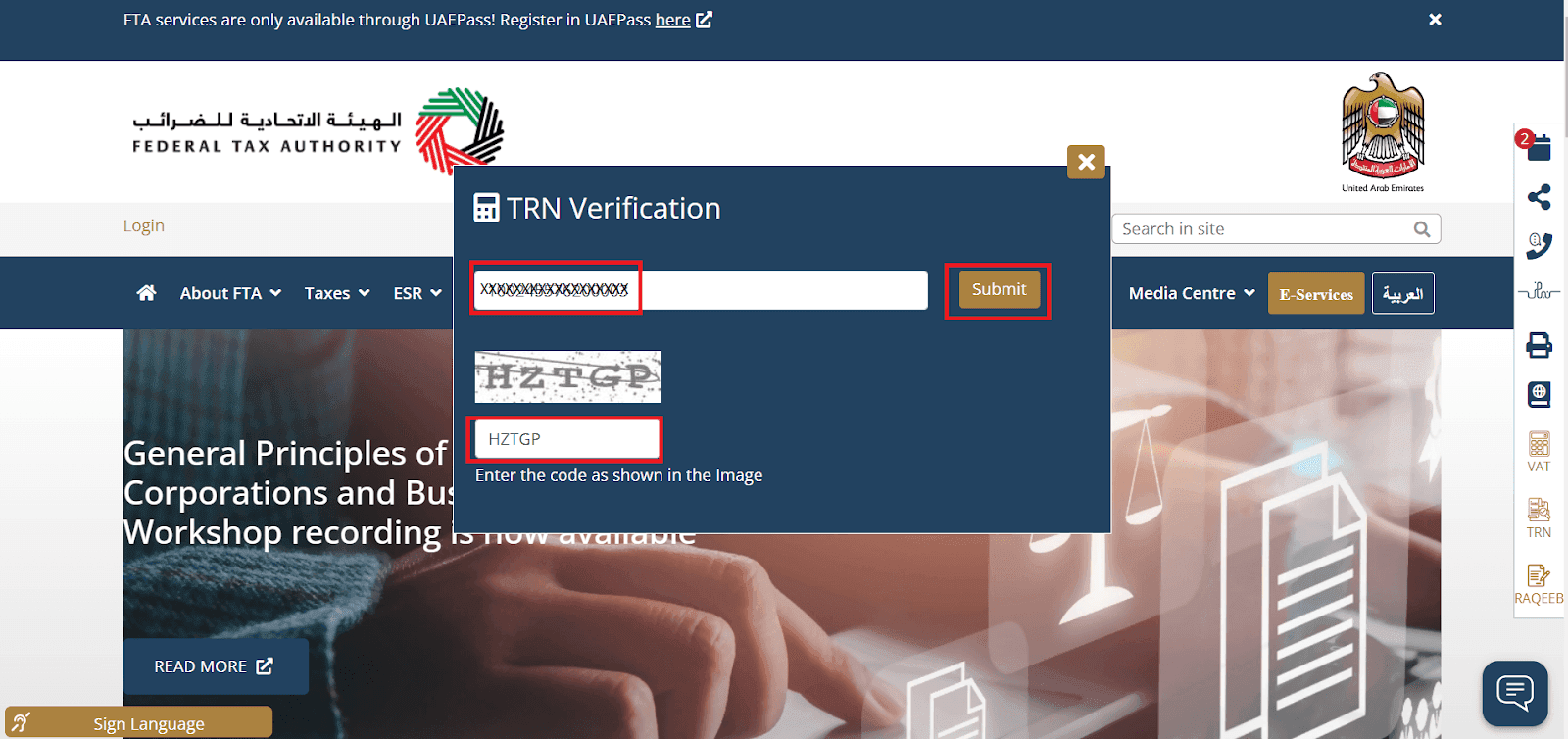
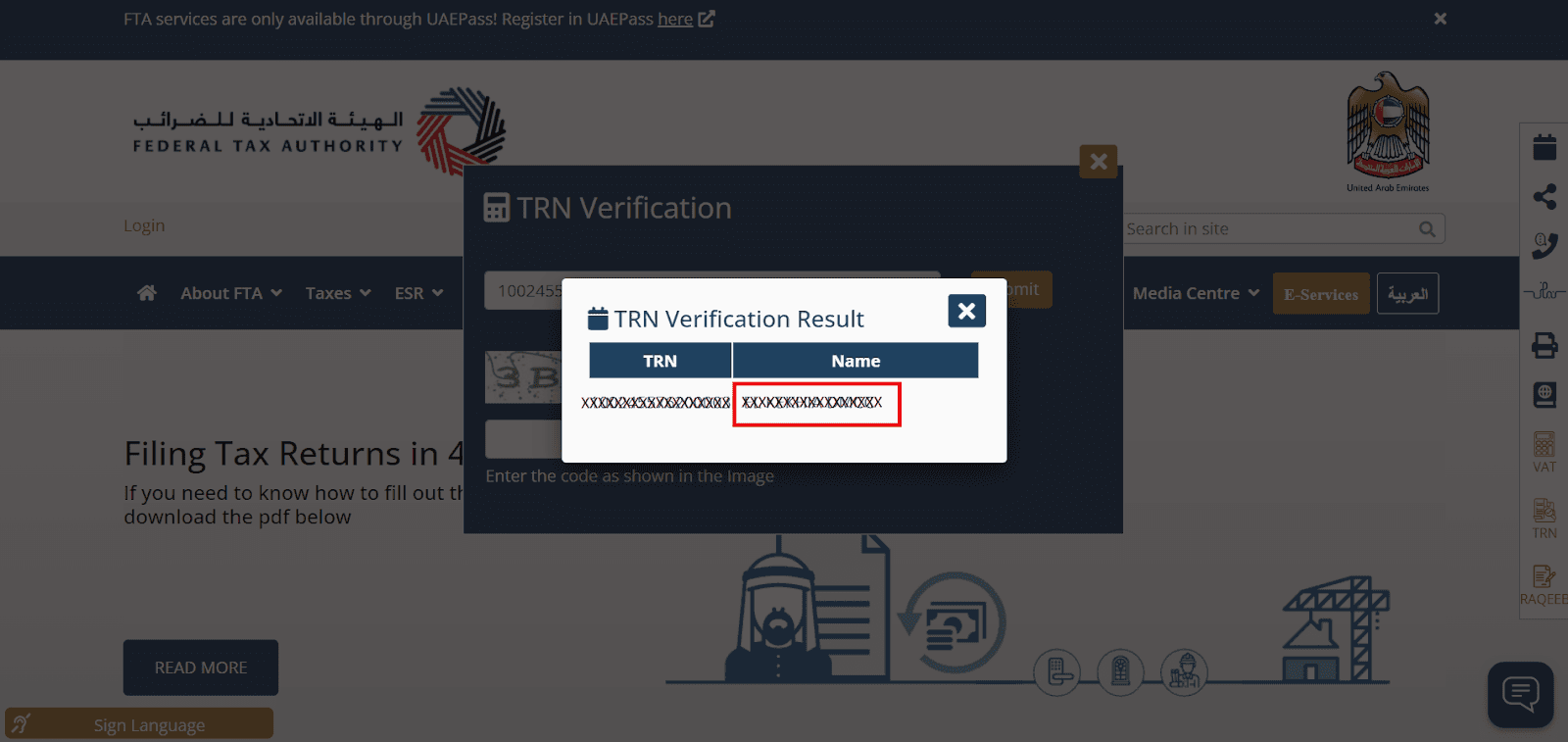
You verify a TRN free on the FTA’s public TRN Verification tool at tax.gov.ae, with no login required. Open the tool from the FTA homepage links, enter the 15-digit TRN, type the security code shown in the image, and submit. A valid TRN returns the registered legal name in English and Arabic, which confirms the number is live and tied to a registered taxpayer.
- Go to the FTA portal at tax.gov.ae.
- Open the TRN Verification tool from the Quick Links / Other Links menu.
- Enter the 15-digit TRN exactly as printed on the invoice.
- Type the security code shown in the image.
- Submit and read the returned legal name.
What Do TRN Verification Results Mean?
A valid TRN returns the supplier’s registered legal name; anything else means stop and investigate before paying. The tool confirms the number is live and linked to a registered taxpayer. It does not vouch for the invoice amount. Match the returned name to the invoice header exactly before you approve payment.
| Result returned | What it means | What to do | Source |
|---|---|---|---|
| Registered legal name (English and Arabic) | TRN is valid and active | Confirm the name matches the invoice header, then pay | FTA TRN Verification tool, tax.gov.ae |
| “TRN does not exist in the system” | TRN is invalid | Do not pay the VAT; ask the supplier to correct it | FTA TRN Verification tool, tax.gov.ae |
| Returned name differs from the invoice | Possible error or misuse | Withhold payment until the supplier reconciles it | FTA TRN Verification tool, tax.gov.ae |
Do You Need an FTA Login to Verify a TRN?
No. The public TRN Verification lookup needs no login and no UAEPass account. UAEPass, the UAE’s national digital identity and signature solution, is required only for taxpayer services inside EmaraTax, such as registration, filing, and refunds. The FTA launched EmaraTax, its integrated tax platform, on 5 December 2022, replacing the legacy e-Services portal.
The site-wide banner that “FTA services are only available through UAEPass” applies to those logged-in EmaraTax services, per the UAE Government’s UAEPass description. The standalone TRN check stays public.
Why Does TRN Verification Matter for a VAT-Registered Business?
Input tax is recoverable only against a valid tax invoice carrying a valid supplier TRN, so an invalid TRN is lost money plus audit exposure. Article 59 of the UAE VAT Executive Regulation requires the supplier’s TRN on every tax invoice. Verification protects four things at once: your legal compliance, your input tax recovery, your defense in an FTA audit, and your standing with counterparties.
Verification also blocks VAT fraud. A number that returns no registered name signals a supplier charging tax it may never remit. Checking it keeps your filings clean and your recovered input tax defensible.
How Do You Verify a Supplier’s TRN Before Paying an Invoice?
Verify the TRN on the FTA tool and confirm the returned legal name matches the invoice header before you release payment. VAT paid to an unregistered “supplier” is not recoverable, and you still owe the correct tax. Treat verification as a payment gate: check the TRN at vendor onboarding and again on the first invoice.
Red flags that should hold a payment:
- The TRN is not 15 digits.
- The returned legal name does not match the invoice header.
- The supplier refuses to provide a TRN.
What Is the Penalty for an Invalid TRN on an Invoice in the UAE?
The FTA fines incorrect or missing tax invoice details and late or failed VAT registration, in fixed amounts in AED (UAE dirham) under Cabinet Decision No. 49 of 2021. An invalid TRN also triggers disallowed input tax and audit exposure. Each violation carries its own penalty per detected case.
| Violation | Penalty | Source |
|---|---|---|
| Failure to issue a proper tax invoice (must show the TRN) | AED 2,500 per detected case | Cabinet Decision No. 49 of 2021 |
| Failure to display prices inclusive of VAT | AED 5,000 | Cabinet Decision No. 49 of 2021 |
| Failure to register for VAT on time | AED 10,000 | Cabinet Decision No. 49 of 2021 |
TRN vs Corporate Tax Registration Number: What Is the Difference?
They are two different numbers from two separate EmaraTax registrations. The VAT TRN covers VAT. The Corporate Tax Registration Number covers UAE Corporate Tax (CT), effective for financial years starting on or after 1 June 2023. CT applies 0% on taxable income up to AED 375,000 and 9% above it, per the Ministry of Finance corporate tax announcement.
| Attribute | VAT TRN | Corporate Tax Registration Number | Source |
|---|---|---|---|
| Tax regime | Value Added Tax | Corporate Tax | FTA / Ministry of Finance |
| Effective from | 1 January 2018 | Financial years on or after 1 June 2023 | FTA / Ministry of Finance |
| Rate | 5% standard | 0% up to AED 375,000; 9% above | FTA / Ministry of Finance |
| Registration route | EmaraTax via UAEPass | EmaraTax via UAEPass | FTA |
| Where it appears | Tax invoices, credit notes, correspondence | Corporate Tax returns and filings | FTA |
Readers who need the wider CT picture can work through Commenda’s guide to corporate tax in the UAE.
How Do You Register for a TRN in the UAE?
Register through EmaraTax using your UAEPass login. Registration is mandatory once taxable supplies and imports exceed AED 375,000 over the previous 12 months, or are expected to within the next 30 days. Voluntary registration is available above AED 187,500. Non-resident businesses making taxable supplies in the UAE must register regardless of value.
| Threshold type | Amount | Basis | Source |
|---|---|---|---|
| Mandatory | AED 375,000 | Taxable supplies and imports, prior 12 months or next 30 days | FTA VAT registration guidance |
| Voluntary | AED 187,500 | Taxable supplies, imports, or expenses | FTA VAT registration guidance |
| Non-resident suppliers | No minimum | Any taxable supply in the UAE unless another UAE party accounts for the VAT | UAE Government portal (u.ae) |
Documents typically required for TRN registration on the FTA VAT registration guidance include the trade license, the passport and Emirates ID of the authorized signatory, proof of authorization, bank account (IBAN) details, and a declaration of turnover and business activities. Foreign entities can follow Commenda’s walkthrough on VAT registration in the UAE for foreign companies; new entities should first secure a UAE trade license and, where relevant, set up a UAE LLC.
Can Finance Teams Automate TRN Verification?
The FTA’s public tool checks one TRN at a time, so finance teams handling volume verify at vendor onboarding and re-verify periodically through their accounts payable (AP) or tax software. There is no official FTA bulk API for public TRN checks. Automation lives in your compliance stack, not on the FTA portal.
Commenda’s Global Tax ID Verification tool checks supplier tax IDs across countries, and the platform’s 100+ ERP, API, and custom integrations let AP teams fold that check into their existing invoice workflow.
What Do Tax Agents in the UAE Do for TRN Registration and Verification?
The FTA runs a Tax Agent Programme with a public register of approved agents. A registered tax agent handles VAT registration, filings, and FTA correspondence for a business, acting on its behalf inside EmaraTax. The business still owns the underlying compliance obligation. Choosing an agent from the FTA’s register confirms they are authorized to represent you.
How Commenda Helps With UAE VAT Compliance
Commenda’s indirect tax platform tracks your VAT registrations, filings, and deadlines across every jurisdiction you operate in, so supplier and entity compliance is certain, not assumed. You confirm a TRN is valid, that the filing tied to it happened, and that the deadline is covered, all in one place.
Verify supplier tax IDs with Commenda’s Global Tax ID Verification tool, keep every UAE filing date in view with the Compliance Calendar, and extend the same checks region-wide with our GCC VAT number verification guide. Book a demo to get a free UAE VAT compliance assessment.