You cannot file, partner, or expand in Oklahoma without checking the state record first. A name conflict stops a formation. A lapsed registration sinks a deal. Investors and lenders ask for proof of standing before they sign.
The Oklahoma Business Entity Search answers those questions for free. The Oklahoma Secretary of State (SOS) runs it at the official Oklahoma business entity search page. This guide shows entrepreneurs, investors, and legal professionals how to search it, read the results, and act on them.
What Is the Oklahoma Business Entity Search?
It is the free official lookup tool run by the Oklahoma Secretary of State’s Business Filing Department at sos.ok.gov/corp/corpInquiryFind.aspx. It covers every registered domestic and foreign entity in the state. The SOS confirms the basic name lookup needs no login, per the SOS search page.
Use it to:
- Check whether a business name is available.
- Confirm an entity’s type and status.
- Read the filing number and registered agent.
- Support due diligence on partners, vendors, and acquisition targets.
One warning: secretaryofstate.com is a privately owned lookalike, not the state site. Only sos.ok.gov is the official Oklahoma record.
Why Should You Run an Oklahoma Business Entity Search?
Run it to protect three things: your name, your deal, and your standing. Name availability keeps a filing from being rejected. Due diligence confirms a counterparty is real and current. Compliance monitoring flags a suspension or dissolution before it costs you. All three come from one free search.
How Do You Verify an Oklahoma Business Is Legitimate?
Search the name, confirm the record exists, and check that the status reads Active. Read the registered agent to confirm a current service-of-process contact. For high-stakes deals, order a certificate of good standing as documented proof. A single search shows status; a certificate proves it.
What Types of Business Entities Appear in Oklahoma Search Results?
Every entity that must file with the SOS appears in the search. Sole proprietorships and general partnerships appear only if they registered a trade name (DBA, “doing business as”). A foreign entity is one formed in another state that has qualified to do business in Oklahoma. Once qualified, it appears alongside domestic entities.
| Entity type | Formation document | Registers with SOS? | Appears in search? | Source |
|---|---|---|---|---|
| Sole proprietorship | None (trade name optional) | No, unless a trade name is filed | Only if a trade name is filed | SOS Business Filing Dept. |
| General partnership | None (trade name optional) | No, unless a trade name is filed | Only if a trade name is filed | SOS Business Filing Dept. |
| Limited partnership (LP) | Certificate of Limited Partnership | Yes | Yes | 54 O.S. §311.1 |
| Limited liability company (LLC) | Articles of Organization | Yes | Yes | 18 O.S. §2005 |
| Corporation | Certificate of Incorporation | Yes | Yes | 18 O.S. §1005 |
| Limited liability partnership (LLP) | Registration / Statement of Qualification | Yes | Yes | SOS Business Filing Dept. |
| Foreign entity | Certificate of Qualification / Authority | Yes | Yes | 18 O.S. §1130 |
Corporations form under the Oklahoma General Corporation Act, 18 O.S. §1005, by filing a Certificate of Incorporation. The SOS Business Filing Department processes filings “for both domestic and foreign entities,” per oklahoma.gov. So a qualified out-of-state company shows up in the same results as a home-grown one.
How Do You Perform an Oklahoma Business Entity Search?
Search for free at the SOS site by name, filing number, registered agent, or officer. No account is required. The five steps below run the search and open a full record.
Step 1: Visit the Oklahoma Secretary of State website
Go to the SOS site and open the Business Entity Search page under Business Services. This is the official free tool.
Step 2: Enter entity name, filing number, or officer/agent details
Enter a business name in the basic search, or use the Advanced Search link below the box to search by filing number, registered agent, or officer. Oklahoma uses the term “filing number.” Other states call the same SOS-assigned number an “entity ID” or “entity number.”
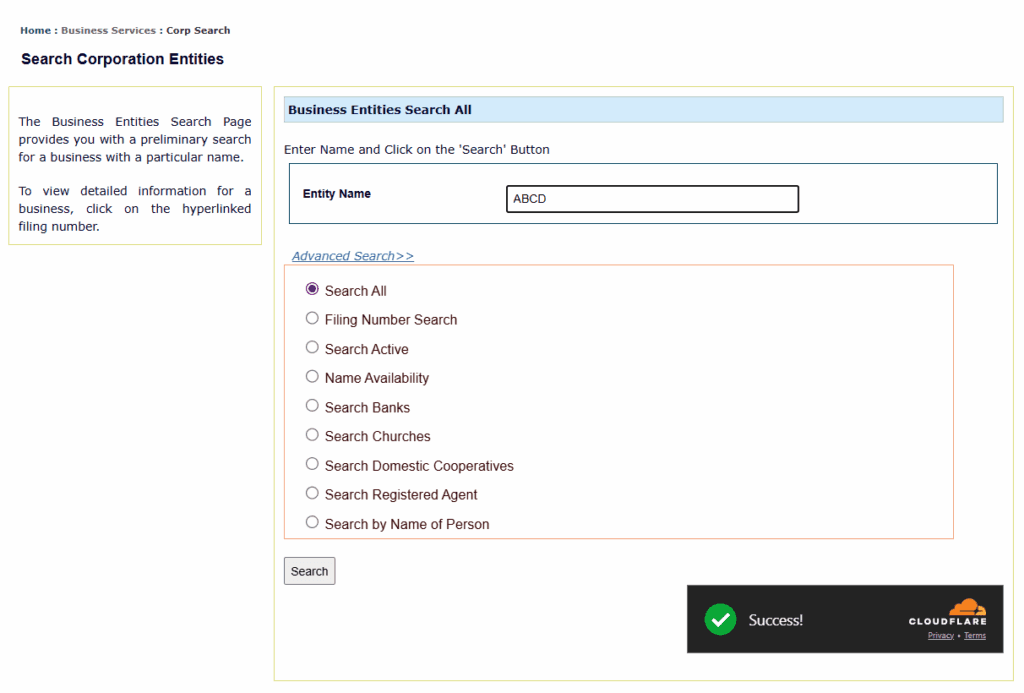
Step 3: Review search results
Read the results columns: Filing Number, Name, Entity Type, Registered Agent, and Type & Status. The SOS labels this a “preliminary search.” New filings appear only after the Business Filing Department processes them, so allow processing time before expecting a fresh registration to show.
Step 4: Click into individual entity details
Click the hyperlinked filing number to open the entity record. A short page then asks for your personal name and email address. Select Continue to view the Entity Summary Information. No SOS account, login, or fee is required for this step, per the SOS search page.
Step 5: Request official documents (optional)
Order certified copies or a certificate of good standing through the SOS Business Entity Orders page. Not all records are viewable online; certified and historical documents are ordered for a fee. A certificate of good standing costs $20.00, per the SOS fee schedule.
How Do You Check If a Business Name Is Available in Oklahoma?
Search the entity database; a new name must be distinguishable from every registered name. Punctuation, spacing, and generic words like “Company” or “Group” do not make a name distinguishable. Required designators still apply: an LLC name must include “LLC” and a corporation “Inc.” or similar. The search is preliminary; the SOS makes the final call at filing.
You can hold a cleared name before you file. A name reservation costs $10.00 and holds the name for 60 days under 18 O.S. §2009, renewable once for another 60 days. To pre-screen a name across states, use Commenda’s company name checker.
How Do You Look Up a Registered Agent in Oklahoma?
Use Advanced Search to search by registered agent name, or read the Registered Agent column in any result row. Every registered Oklahoma entity must maintain a registered agent with a physical Oklahoma address. The agent shown is the entity’s official service-of-process contact for legal and state notices.
What Do Oklahoma Entity Status Labels Mean?
Status tells you whether the entity may legally operate. Active means it may; the others mean it may not, or no longer exists. Read the status before you sign, lend, or partner.
| Status | What it means | Source |
|---|---|---|
| Active | In good standing; certificates filed and fees paid | SOS entity search |
| Inactive | Not in good standing, often after missing the annual certificate past its 60-day grace | 18 O.S. §2055.2 |
| Dissolved | Formally terminated, voluntarily or by state action; no longer a legal entity | SOS entity search |
| Terminated | Stripped of good standing and no longer authorized to operate | SOS entity search |
| Cancelled | Registration revoked, usually for administrative non-compliance | 18 O.S. §2055.2 |
| Withdrawn | A foreign entity that has ended its Oklahoma registration | SOS entity search |
| Merged | Combined into a surviving entity; no separate existence remains | SOS entity search |
How Do You Check If an Oklahoma Business Is in Good Standing?
Run the search and confirm the status reads Active. For proof a bank or investor will accept, order a certificate of good standing from the SOS. The search shows current status for free; the certificate is the official document that confirms it.
How Do You Request an Oklahoma Certificate of Good Standing?
Order it from the SOS Business Entity Orders page, enter the entity’s filing number, place the order, and pay $20.00, per the SOS fee schedule. Use it to open bank accounts, secure financing, qualify in another state, or close a merger or acquisition. The SOS publishes no fixed online turnaround, so order ahead of a deadline.
What Are Oklahoma’s Annual Filing and Franchise Tax Requirements?
Oklahoma has no universal annual report. LLCs file a $25.00 annual certificate with the SOS, and the corporate franchise tax is repealed as of tax year 2024. The table below sets out the recurring obligations and the franchise tax history.
| Requirement | Detail | Source |
|---|---|---|
| LLC annual certificate (domestic and foreign) | $25.00 per year, due on the anniversary date | 18 O.S. §2055.2 |
| LP annual certificate | $50.00 per year | 54 O.S. §311.1 |
| LLC past due | Loses good standing; prolonged failure to file leads to cancellation | 18 O.S. §2055.2 |
| Credit card payment | 4% surcharge on card transactions | SOS fee schedule |
| Corporate franchise tax, through tax year 2023 | Final year a return was required; final returns due June 1, 2024 (maximum-tax filers) or Sept. 15, 2024 (all other filers) | Oklahoma Tax Commission |
| Corporate franchise tax, tax year 2024 onward | Repealed under House Bill 1039 (HB 1039); no franchise tax due | Oklahoma Tax Commission |
Missing these filings has consequences. An entity can lose good standing, face administrative cancellation, or be involuntarily dissolved. Commenda’s compliance calendar tracks these deadlines by entity and state.
What Are Oklahoma’s Foreign Qualification Requirements?
An out-of-state entity doing business in Oklahoma must register with the SOS before operating. A foreign corporation files a Certificate of Qualification, pays a $300.00 minimum fee, and attaches a home-state certificate of good standing dated within the last 60 days, per the SOS foreign qualification form. A foreign LP registration also costs $300.00.
Once qualified, a foreign LLC owes the same $25.00 annual certificate as a domestic LLC. If you are expanding into neighboring states, the same lookup exists elsewhere: see the Texas business entity search, the Kansas business entity search, and the Arkansas business entity search.
What Should You Do After Your Oklahoma Entity Search?
Your next steps depend on whether you are forming a new entity or researching an existing one. The two paths below cover each case.
For New Business Formation
- Reserve your business name ($10.00 for 60 days, renewable once).
- Submit formation documents. File Articles of Organization for an LLC ($100.00, per 18 O.S. §2055) or a Certificate of Incorporation for a corporation ($50.00 minimum, scaled to authorized capital). Registering online takes about 15 minutes and costs $100.00 plus a service fee, per oklahoma.gov.
- Apply for licenses and permits. Check state and local industry requirements on the Oklahoma business licensing page.
- Obtain a registered agent and EIN. Appoint an agent with a physical Oklahoma address, then get a free Employer Identification Number (EIN) from the IRS.
For Existing Entities or Research-Based Actions
- Save or document your search results for due diligence.
- Request certified documents for proof of standing or historical filings.
- Address compliance issues. An Inactive or Cancelled status means past-due annual certificates and fees; file and pay to reinstate good standing.
How Commenda Helps With Oklahoma Business Compliance
The Oklahoma entity search shows you a snapshot. It does not track your annual certificate deadline, monitor your standing across states, or handle foreign qualification paperwork. That work falls back on spreadsheets and calendar reminders, and one missed filing can push an entity into Inactive or Cancelled status.
Commenda closes that gap. Commenda’s entity management platform tracks filings and deadlines across every state and country you operate in, and its incorporation support forms new Oklahoma entities the same way in every jurisdiction. Pair it with the compliance calendar to see every due date in one view.
Book a demo to get a free compliance-status review of every entity you manage.